Datasets
Info
This feature is available with lakeFS Enterprise and lakeFS Cloud. Start a free trial.
Overview
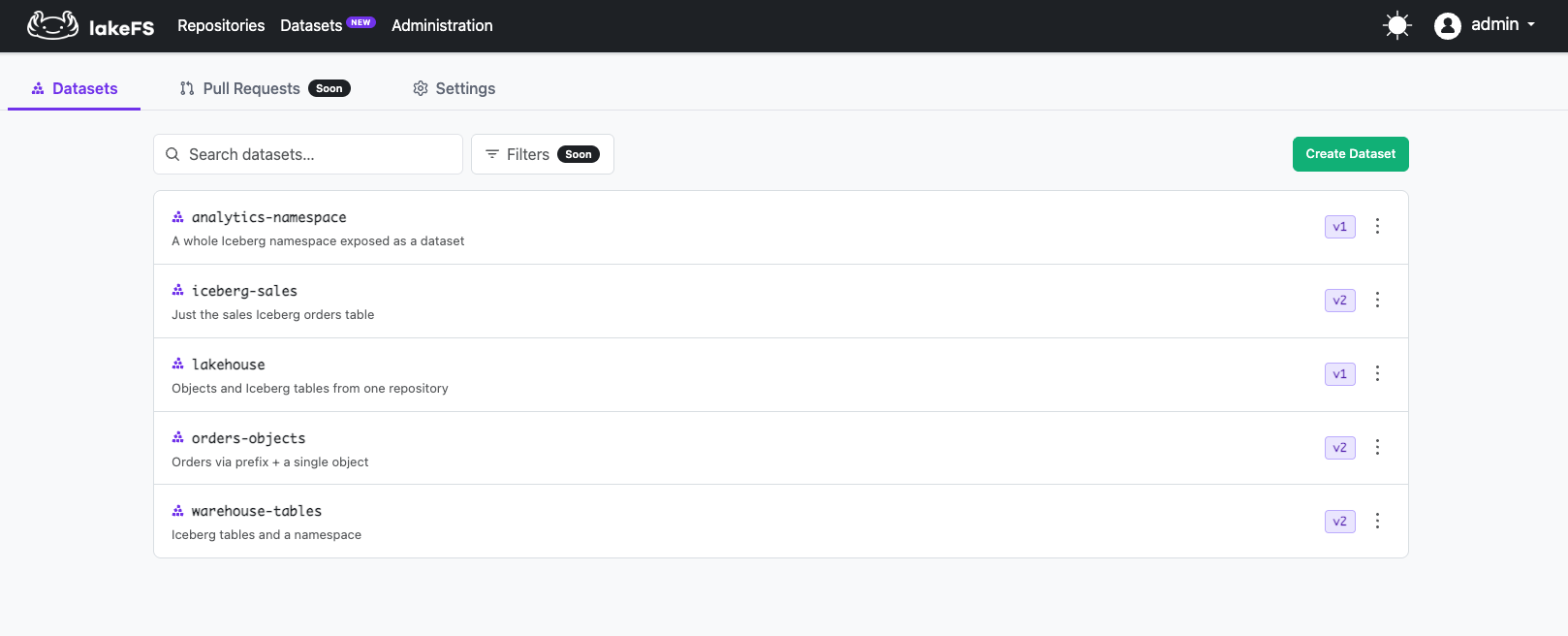
A dataset is a first-class, versioned entity in lakeFS that names a curated view over repository data. Datasets sit alongside repositories at the top level of the installation.
A dataset is a set of pointers plus descriptive metadata. No data is copied: a dataset definition stores references to data in source repositories, not the data itself.
Datasets enable:
- Discoverability: Find data by dataset name across the whole installation, without knowing which repository it lives in.
- Reproducibility: Every dataset version is immutable.
customer-360@v7always resolves to the same set of objects and tables, regardless of how the underlying repository evolved. - Governed sharing: Control data access through the dataset interface, independent of source repository permissions.
Key concepts
| Term | Definition |
|---|---|
| Dataset | A named view over data: a set of pointers (data items) plus descriptive metadata. |
| Data item | A (target, source) pair inside a dataset. The target is the address consumers read; the source is a path, prefix, table, or namespace in a lakeFS repository, pinned to a specific commit. |
Dataset version (v1, v2, ...) |
An immutable, monotonically numbered snapshot of a dataset's definition. Every create or update produces the next version. |
latest |
Always points to the newest published version. |
| Metadata keys | Installation-wide, admin-defined typed attributes (e.g., classification, owner) with optional required/allowed-value constraints. |
Getting started
Configuration
This setting is required before working with datasets. It defines the object storage path (e.g., s3://my-bucket/path/)
where lakeFS stores dataset metadata.
Policies
lakeFS ships with preconfigured dataset policies. New installations (>= v1.89.0) include them automatically.
Note
Installations upgraded from versions prior to v1.89.0 need to create them manually.
See Preconfigured Policies for the full list, including:
DatasetsFullAccess— alldataset:*actionsDatasetsReadWriteAll— list, read, create, update, delete datasets + read metadata keysDatasetsReadAll— list and read datasets + read metadata keysDatasetsManageMetadataKeys— full CRUD on metadata key definitions
Attach the appropriate policy to users or groups. For example, a dataset creator needs DatasetsReadWriteAll, while a
consumer who only browses datasets needs DatasetsReadAll.
Define metadata keys
Before creating datasets, an admin should define the metadata key schema for the installation. See Dataset metadata for details.
Creating and managing datasets
Once configuration, policies, and metadata keys are in place, you're ready to create a dataset. See Creating and managing datasets.
Creating a dataset
A dataset has:
- Name — globally unique, lowercase letters, numbers, and hyphens. Immutable after creation.
- Description — free text.
- Metadata — key/value pairs conforming to the installation's metadata key definitions.
- Data items — a set of
(target, source)pointers into lakeFS repository data. Currently limited to a single repository per dataset.
Each data item points at a specific commit in a source repository. Data items can be one of four types:
| Type | Source | Target address |
|---|---|---|
object |
A single object | Path (e.g., gold/lookup.json) |
prefix |
A path prefix | Path (e.g., gold) |
table |
An Iceberg table | FQN (e.g., sales.orders) |
namespace |
An Iceberg namespace | FQN (e.g., analytics) |
The target is the address consumers use to read the data through the dataset. Targets must be unique within a dataset. See Reading dataset data for how targets map to read paths.
Using the UI
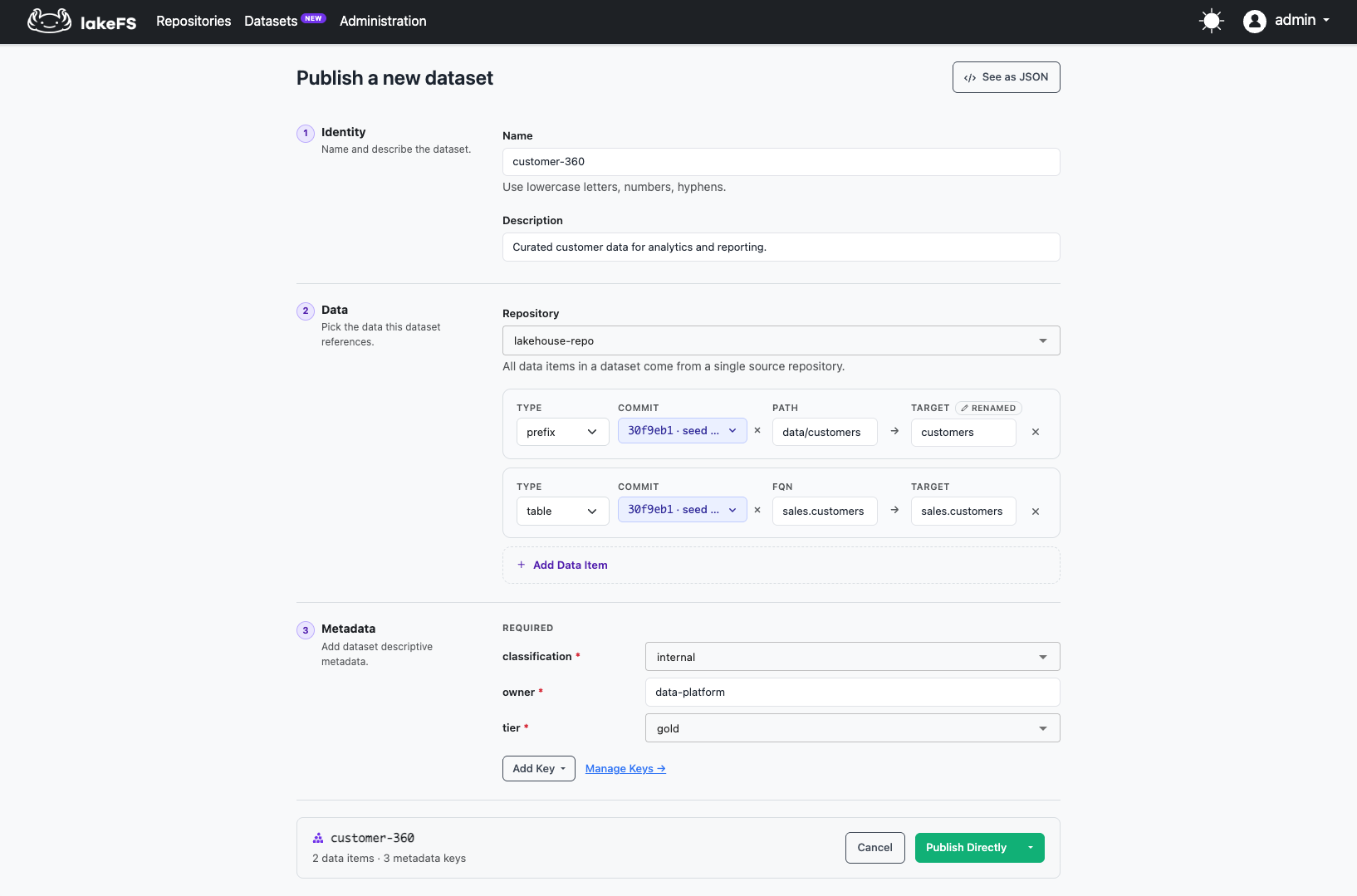
- Navigate to Datasets in the top navigation and click Create Dataset.
- Enter the dataset name and description.
- Select the source repository and add data items - choose the type, select a commit, specify the source path or table, and set the target.
- Fill in the required metadata fields.
- Click Publish directly to create the dataset.
You can also switch to JSON mode to edit the full dataset definition as JSON.
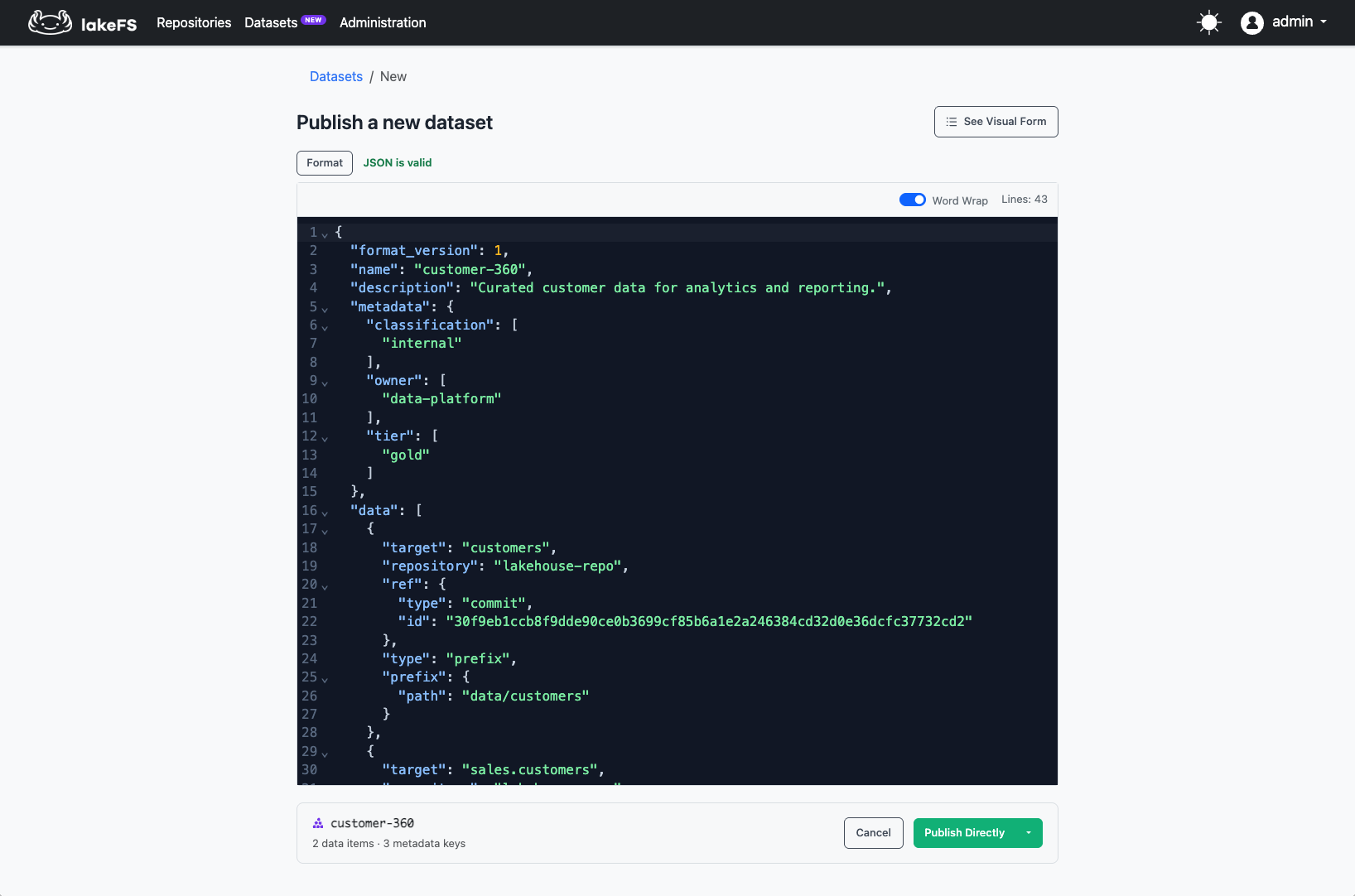
Dataset definition example
{
  "name": "customer-360",
  "definition": {
    "format_version": 1,
    "description": "Curated customer data for analytics and reporting.",
    "metadata": {
      "classification": "internal",
      "owner": "data-platform",
      "tier": "gold",
      "retention": "1y"
    },
    "data": [
      {
        "target": "customers",
        "repository": "lakehouse-repo",
        "ref": { "type": "commit", "id": "30f9eb1c..." },
        "type": "prefix",
        "prefix": { "path": "data/customers/" }
      },
      {
        "target": "sales.customers",
        "repository": "lakehouse-repo",
        "ref": { "type": "commit", "id": "30f9eb1c..." },
        "type": "table",
        "table": { "namespace": "sales", "name": "customers" }
      }
    ]
  },
  "publish": { "message": "Initial dataset with customer objects and table" }
}
Updating a dataset
Edit a dataset to add or remove data items, change metadata, or update the description. Each update produces a new immutable version — the previous version remains accessible.
Dataset metadata
Metadata keys are installation-wide definitions that govern what metadata every dataset must (or may) carry. An admin defines the key schema; dataset creators populate the values.
Defining metadata keys
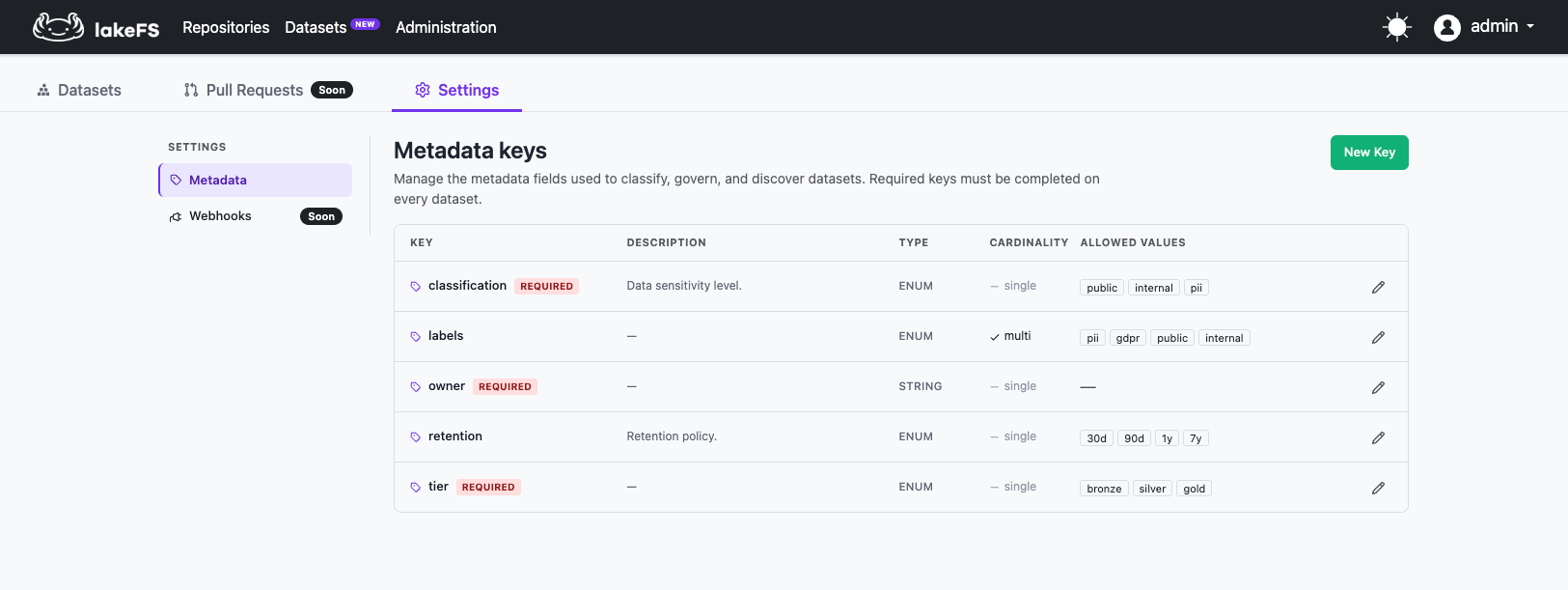
Each metadata key has:
| Property | Description |
|---|---|
| Name | Unique identifier for the key. |
| Type | string, enum, number, boolean, or date. |
| Required | If true, every dataset must provide a value for this key. |
| Allowed values | For enum keys, the set of valid values. |
| Allow multiple | Whether a dataset can provide multiple values for this key. |
| Description | Help text shown in the UI. |
Define keys before creating datasets. Required keys must be populated on every dataset at create and update time.
Tip
Start with a small set of required keys (e.g., owner, classification, tier) and add optional keys as needs
emerge.
Note
Adding a new required key does not retroactively invalidate existing datasets, but the next edit to any dataset must populate the new key.
Versioning
Datasets have linear version history. Every change - whether to data items, metadata, or description - produces the
next monotonic version: v1, v2, v3, and so on.
| Ref | Resolves to | Use case |
|---|---|---|
latest |
The newest published version | Default for consumers who want current data |
v<N> (e.g., v3) |
A specific immutable version | Pin consumers or pipelines to a known state, prove to auditors exactly which data backed a decision |
Version identifiers are system-generated, immutable, and never reused. Once v7 is published, it resolves to the same
bytes forever.
To view the version history of a dataset, navigate to the dataset's detail page and click the History tab. Each
entry shows the version identifier (v1, v2, ...), the publish message, author, and timestamp
Comparing versions
You can compare any two dataset versions to see exactly what changed. The diff shows:
- Data items that were added, removed, or modified
- Metadata values that changed
- Description updates
To compare versions, use the diff endpoint: GET /api/v1/datasets/{dataset}/refs/{leftRef}/diff/{rightRef}.
For example, after adding the sales.orders table to customer-360 (producing v2), you can see what changed:
The response shows that sales.orders was added as a new data item.
Reading dataset data
How it works
Datasets are addressable using standard lakeFS URIs and Iceberg FQNs — use the dataset name where you would normally
use a repository name, and use latest or v<N> as the ref. Any tool that works with lakeFS today works with
datasets out of the box.
Reading objects
Use the dataset name and the version as the ref. The data item's target becomes the path.
| What you're reading | lakefs:// URI |
s3:// URI (via S3 gateway) |
|---|---|---|
Latest version of customers.csv |
lakefs://customer-360/latest/customers/customers.csv |
s3://customer-360/latest/customers/customers.csv |
| Pinned to version 3 | lakefs://customer-360/v3/customers/customers.csv |
s3://customer-360/v3/customers/customers.csv |
List all objects under customers/ |
lakefs://customer-360/latest/customers/ |
s3://customer-360/latest/customers/ |
Both lakefs:// and s3:// (via the S3 gateway) URI schemes are supported.
Reading tables (Iceberg)
For table data items, use the lakeFS Iceberg catalog FQN with the dataset name as the repository:
| What you're reading | Iceberg FQN |
|---|---|
Latest version of sales.customers |
catalog.customer-360.latest.sales.customers |
| Pinned to version 3 | catalog.customer-360.v3.sales.customers |
These FQNs work with any Iceberg client configured against the lakeFS Iceberg REST catalog: Spark, Trino, PyIceberg, and others.
Access control
Dataset lifecycle permissions
Dataset operations use the dataset:* action namespace with resource ARN arn:lakefs:dataset:::dataset/{datasetId}.
Use arn:lakefs:dataset:::* to grant access to all datasets.
For the full list of dataset actions and their API endpoints, see Actions and Permissions. For ready-to-use policy definitions, see Preconfigured Policies.
Data access through datasets
Data access uses the same RBAC primitives you already know — fs:* actions for objects and catalog:* actions for
tables. In the ARN, use the dataset name where you would normally use a repository name.
Two key principles govern how this works:
Attach-time enforcement
A dataset creator can only attach data they can read. For objects and prefixes, this means fs:ListObjects +
fs:ReadObject on the source path. For tables and namespaces, the equivalent catalog permissions (catalog:ReadTable,
catalog:ListTables, etc.) on the source. If the creator lacks access to any attached source, the dataset create/update
is rejected.
Independent access path
A consumer reading data through a dataset only needs grants scoped to the dataset, not to the source repos. Source repo policies are not evaluated at read time. This means:
- A consumer granted
fs:ReadObjectoncustomer-360can read the data even if they have no grants on the source repo. - Even if the consumer has an explicit deny on the source repo, reading through the dataset still works. The dataset is the access boundary.
Example: granting a consumer read access
Create a policy granting read access scoped to the dataset:
{
  "id": "ReadCustomer360",
  "statement": [
    {
      "effect": "allow",
      "action": ["fs:ListObjects"],
      "resource": "arn:lakefs:fs:::repository/customer-360"
    },
    {
      "effect": "allow",
      "action": ["fs:ReadObject"],
      "resource": "arn:lakefs:fs:::repository/customer-360/object/*"
    },
    {
      "effect": "allow",
      "action": ["catalog:ListNamespaces", "catalog:GetNamespace", "catalog:ListTables"],
      "resource": "arn:lakefs:catalog:::namespace/customer-360/*"
    },
    {
      "effect": "allow",
      "action": ["catalog:ReadTable"],
      "resource": "arn:lakefs:catalog:::table/customer-360/*/*"
    }
  ]
}
The consumer can now read lakefs://customer-360/latest/customers/customers.csv and query
catalog.customer-360.latest.sales.customers — without any access to lakehouse-repo.
Limitations
- Single repository per dataset: Currently, all data items in a dataset must reference the same source repository. Multi-repository datasets are on the roadmap.
- Garbage collection: Datasets reference data in source repositories. If the underlying data is removed by garbage collection on the source repository, the dataset's references will become unresolvable. Ensure that source data referenced by datasets is protected from garbage collection.