Using lakeFS with DuckDB
DuckDB is an in-process SQL OLAP database management system. You can access data in lakeFS from DuckDB, as well as use DuckDB from within the web interface of lakeFS
Iceberg REST Catalog
The recommended way to access lakeFS from DuckDB is to use the Iceberg REST Catalog, built into lakeFS Enterprise. In this mode, lakeFS stays completely outside the data path: data is read and written by DuckDB directly to the underlying object store, while lakeFS versions the table metadata.
LOAD iceberg;
LOAD httpfs;

CREATE SECRET lakefs_credentials (
    TYPE ICEBERG,
    CLIENT_ID 'AKIAIOSFODNN7EXAMPLE',
    CLIENT_SECRET 'wJalrXUtnFEMI/K7MDENG/bPxRfiCYEXAMPLEKEY',
    OAUTH2_SERVER_URI 'https://lakefs.example.com/iceberg/api/v1/oauth/tokens'
);

ATTACH '' AS main_branch (
    TYPE iceberg,
    SECRET lakefs_credentials,
    ENDPOINT 'https://lakefs.example.com/iceberg/relative_to/my-repo.main/api'
);

USE main_branch.inventory;
SELECT * FROM books;
Tip
To learn more about the Iceberg REST Catalog, see the Iceberg integration documentation.
Advanced: Alternative Access Methods
The Iceberg REST Catalog above is the recommended way to access lakeFS from DuckDB. The methods below cover non-Iceberg formats through the S3 Gateway, Python access with lakefs-spec, and the DuckDB query editor built into the lakeFS web UI.
Using DuckDB with the S3 Gateway
Using the S3 Gateway allows reading and writing data to lakeFS from DuckDB, in any format supported by DuckDB (i.e. not just Iceberg tables). While flexible, this approach requires lakeFS to be involved in the data path, which can be less efficient than the Iceberg REST Catalog approach, since lakeFS has to proxy all data operations through the lakeFS server.
Configuration
Querying data in lakeFS from DuckDB is similar to querying data in S3 from DuckDB. It is done using the httpfs extension connecting to the S3 Gateway that lakeFS provides.
If not loaded already, install and load the HTTPFS extension:
Then run the following to configure the connection.
-- "s3_region" is the S3 region on which your bucket resides. If local storage, or not S3, then just set it to "us-east-1".
SET s3_region='us-east-1';
-- the host (and port, if necessary) of your lakeFS server
SET s3_endpoint='lakefs.example.com';
-- the access credentials for your lakeFS user
SET s3_access_key_id='AKIAIOSFODNN7EXAMPLE';
-- the access credentials for your lakeFS user
SET s3_secret_access_key='wJalrXUtnFEMI/K7MDENG/bPxRfiCYEXAMPLEKEY';
SET s3_url_style='path';

-- Uncomment in case the endpoint listen on non-secure, for example running lakeFS locally.
-- SET s3_use_ssl=false;
Querying Data
Once configured, you can query data using the lakeFS S3 Gateway using the following URI pattern:
Since the S3 Gateway implemenets all S3 functionality required by DuckDB, you can query using globs and patterns, including support for Hive-partitioned data.
Example:
SELECT *
FROM parquet_scan('s3://example-repo/main/data/population/by-region/*.parquet', HIVE_PARTITIONING=1)
ORDER BY name;
Writing Data
No special configuration required for writing to a branch. Assuming the configuration above and write permissions to a dev branch,
a write operation would look like any DuckDB write:
CREATE TABLE sampled_population AS SELECT *
FROM parquet_scan('s3://example-repo/main/data/population/by-region/*.parquet', HIVE_PARTITIONING=1)
USING SAMPLE reservoir(50000 ROWS) REPEATABLE (100);

COPY sampled_population TO 's3://example-repo/main/data/population/sample.parquet'; -- actual write happens here
Using DuckDB in Python with lakefs-spec
Python users can use DuckDB by leveraging the lakefs-spec package.
Note
This library is a third-party package and not maintained by the lakeFS developers; please file issues and bug reports directly in the lakefs-spec repository.
Using lakefs-spec, querying lakeFS could be done using pre-signed URLs, allowing for efficient and secure I/O, where the data files are read directly from the underlying object store.
import duckdb
from fsspec import filesystem

duckdb.register_filesystem(filesystem('lakefs'))

duckdb.sql("SELECT * FROM 'lakefs://example-repo/main/data/population/sample.parquet'")
Using DuckDB in the lakeFS web UI
The lakeFS web UI includes DuckDB in the Object viewer page.
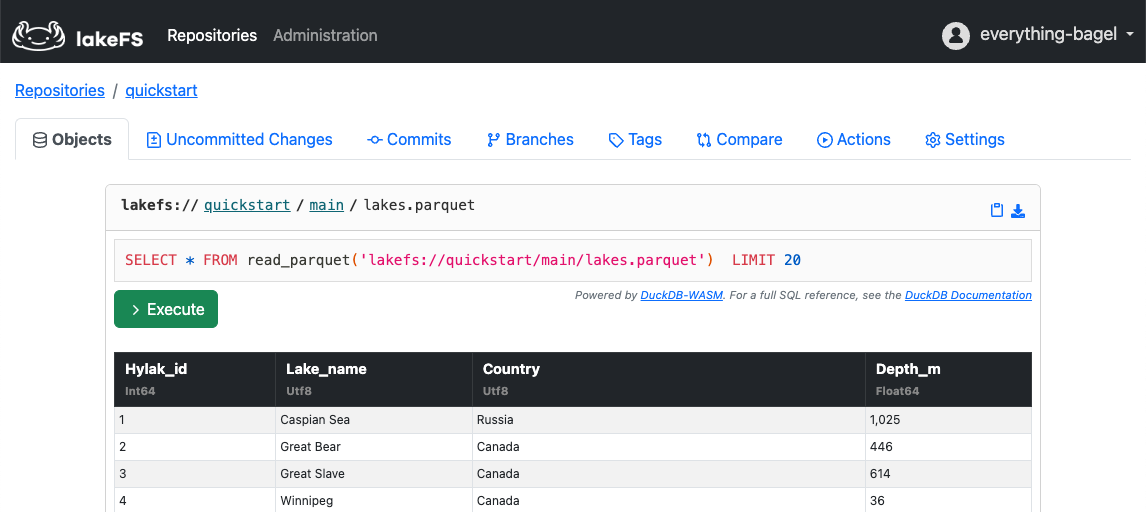
Using this you can query objects in lakeFS directly using a lakefs path:
lakefs://<repository>/<branch>/object/path/foo.parquet
The DuckDB query editor is provided by DuckDB WASM. It renders and provides querying capabilities for any objects of the following types:
- Parquet
- CSV
- TSV