lakeFS Internals
This page explains how lakeFS works beneath the surface. It starts with the data model that blends Git and object-store concepts, then follows the data down through how objects are physically stored, how merges work, the versioning internals that make immutable commits efficient, and finally the metadata store that keeps references consistent. You can read it top to bottom, or jump to the layer you care about.
Data Model
lakeFS blends concepts from object stores such as S3 with concepts from Git, so most of the terms below will be familiar if you have used either.
lakeFS is an interface to manage objects in an object store. The actual data itself is not stored inside lakeFS directly but in an underlying object store, and lakeFS manages pointers and additional metadata about those objects.
Repository
In lakeFS, a repository is a set of related objects, or collections of objects. In many cases these represent tables of various formats for tabular data, semi-structured data such as JSON or log files, or a set of unstructured objects such as images, videos, and sensor data. A repository is a logical namespace that groups together objects, branches, and commits, analogous to a repository in Git.
Repository names must start with a lower case letter or number, contain only lower case letters, numbers, and hyphens, and be between 3 and 63 characters long.
Commits
Using commits, you can view a repository at a certain point in its history with a guarantee that the data you see is exactly as it was at the moment of committing. Commits are immutable "checkpoints" containing all the contents of a repository at a given point in its history.
Each commit contains metadata such as the committer, timestamp, and a commit message, along with arbitrary key/value pairs you can choose to add.
Identifying commits
A commit is identified by its commit ID, a digest of all the contents of the commit. Commit IDs are long by nature, so you may use a unique prefix to abbreviate them. A commit may also be identified using a textual definition called a ref, and examples of refs include tags, branch names, and expressions.
Branches
Branches in lakeFS let users create their own isolated view of the repository. Changes on one branch do not appear on other branches, and users can take changes from one branch and apply them to another by merging them.
Zero-copy branching
Under the hood, a branch is simply a pointer to a commit along with a set of uncommitted changes. Creating a branch is a zero-copy operation: instead of duplicating data, lakeFS creates a pointer to the source commit for the branch.
Tags
Tags give a meaningful name to a specific commit, letting users reference specific releases, experiments, or versions with a human-friendly name. For example, v2.3 marks a release, and dev-jane-before-v2.3-merge marks Jane's private temporary point. Tag names adhere to the same rules as Git ref names.
History
The history of a branch is the list of commits from the branch tip through the first parent of each commit. Histories go back in time.
Merge
Merging integrates changes from one branch into another. The result of a merge is a new commit, with the destination as the first parent and the source as the second. For the full three-way merge algorithm and conflict rules, see how merges work below.
Ref expressions
lakeFS supports expressions for creating a ref, similar to revisions in Git, and all the ~ and ^ examples at the end of that section work unchanged in lakeFS.
- A branch or a tag is a ref expression.
- If
<ref>is a ref expression, then:<ref>^is a ref expression referring to its first parent.<ref>^Nrefers to its N'th parent; in particular<ref>^1is the same as<ref>^.<ref>~refers to its first parent, so<ref>~is the same as<ref>^.<ref>~Nrefers to its N'th parent, always traversing to the first parent, so<ref>~Nis the same as<ref>^^...^with N consecutive carets.
Concepts unique to lakeFS
The underlying storage is a location in an object store where lakeFS keeps your objects and some immutable metadata. When creating a lakeFS repository, you assign it a storage namespace, a location in the underlying storage where data for that repository is stored.
We sometimes refer to underlying storage as physical, and the path used to store the contents of an object is termed a physical path. Once lakeFS saves an object in the underlying storage it is never modified, except to remove it entirely during cleanups. Much of what lakeFS does is manage how lakeFS paths translate to physical paths on the object store, a mapping that is generally not straightforward. Contrary to many object stores, lakeFS may map multiple paths to the same object on backing storage, and it always does this for objects that are unchanged across versions.
Within the storage namespace, lakeFS stores objects under a data/ prefix. On lakeFS Enterprise (starting at v1.85.0), objects are organized into shards and partitions derived from the object's internal ID. The resulting physical path (data/<shard>/<sub-shard>/<partition>/<id>) bears no relation to the lakeFS path. Spreading objects across a large number of fixed and stable prefixes lets cloud object stores avoid hot-spots during write bursts.
lakefs protocol URIs
lakeFS uses a specific format for path URIs. The URI lakefs://<REPO>/<REF>/<KEY> is a path to objects in the given repo and ref expression under key. This is used both for path prefixes and for full paths. In similar fashion, lakefs://<REPO>/<REF> identifies the repository at a ref expression, and lakefs://<REPO> identifies a repo.
How lakeFS Stores Your Data
Because lakeFS is a data versioning engine, it needs to save multiple versions of the same object, so it stores objects in the object store in a way that allows efficient versioning. This can make it confusing to understand where your data actually lives, and this section sheds light on that.
lakeFS stores repository data and metadata under the repository's storage namespace, a dedicated path in the object store. Listing that namespace shows two prefixes:
lakeFS stores the actual user data under the data/ prefix. The _lakefs/ prefix holds commit metadata, including the range and meta-range files and internal lakeFS data. Since lakeFS manages immutable data, objects are not saved under their logical name, which could be overwritten and violate the immutability guarantee. When you upload a CSV file called allstar_games_stats.csv to branch main, lakeFS generates a random physical address under the data/ prefix and uploads it there. The mapping from a path to an object changes as you upload, commit, and merge, and when you update an object lakeFS creates a new physical address for that version while preserving the others. lakeFS links the object's logical address to its physical address and stores that relation in the commit metadata.
lakeFS uses its object store immutably, so anything uploaded is never changed or overridden. See garbage collection for how and when lakeFS actually deletes data from storage. To find data, lakeFS uses the logical address such as lakefs://my-repo/main/allstar_games_stats.csv, indicating a repository and branch. Using the KV metadata store, lakeFS first looks for an uncommitted version of the object in the given branch, and if none exists it takes the latest committed version from the branch head:
- In the KV metadata store under the current staging token of branch
main, which returns any uncommitted changes for the object. - From the branch's head meta-range and range, saved under the
_lakefs/prefix in the object store, which returns the metadata for the object as it was stored in the latest commit formain.
In lakeFS Enterprise, if staging compaction has folded the branch's uncommitted data into a meta-range, the second step reads that meta-range instead of the head commit's, since it holds both the commit's data and the folded changes.
The physical path returned takes the form s3://<storage_namespace>/data/gp0n1l7d77pn0cke6jjg/cg6p50nd77pn0cke6jk0. The same object in lakeFS might have several physical addresses, one for each version where it exists.
Finding an object's location on your object store
One way to determine the physical location of an object is the lakectl fs stat command:
lakectl fs stat --pre-sign=false lakefs://my-repo/main/allstar_games_stats.csv
Path: allstar_games_stats.csv
Modified Time: 2024-08-02 10:13:33 -0400 EDT
Size: 0 bytes
Human Size: 0 B
Physical Address: s3://niro-test/repos/docs/data/data/geh1jurck6tfom0s1t8g/cqmej33ck6tfom0s1tvg
Checksum: d41d8cd98f00b204e9800998ecf8427e
Content-Type: application/octet-stream
lakeFS can show any version of an object. For example, to see an object's physical location on branch dev from three versions ago, use the reference dev~3:
lakectl fs stat lakefs://my-repo/dev~3/allstar_games_stats.csv
Path: allstar_games_stats.csv
Modified Time: 2024-08-02 10:11:49 -0400 EDT
Size: 916393 bytes
Human Size: 916.4 kB
Physical Address: s3://<storage_namespace>/data/data/geh1jurck6tfom0s1t8g/cqmei9bck6tfom0s1tt0
Checksum: 48e04a4c072acdcf932ee6c43f46ef14
Content-Type: application/octet-stream
This works with any lakeFS reference type. To learn more about how lakeFS stores your data, see this blog post.
How Merges Work
The merge operation in lakeFS is similar to Git. It incorporates changes from a merge source, a commit or reference, into a merge destination, which is a branch.
lakeFS first finds the merge base, the nearest common ancestor of the two commits, and then performs a three-way merge by examining the presence and identity of files in each commit. In the table below, "A", "B", and "C" are possible file contents, "X" is a missing file, and "conflict" is a merge failure that only appears as a result.
| In base | In source | In destination | Result | Comment |
|---|---|---|---|---|
| A | A | A | A | Unchanged file |
| A | B | B | B | Files changed on both sides in same way |
| A | B | C | conflict | Files changed on both sides differently |
| A | A | B | B | File changed only on one branch |
| A | B | A | B | File changed only on one branch |
| A | X | X | X | Files deleted on both sides |
| A | B | X | conflict | File changed on one side, deleted on the other |
| A | X | B | conflict | File changed on one side, deleted on the other |
| A | A | X | X | File deleted on one side |
| A | X | A | X | File deleted on one side |
Merge strategies
The API and lakectl allow passing an optional strategy flag. With source-wins, a conflict resolves in favor of the source objects, and with dest-wins it resolves in favor of the destination objects:
Example
The strategy applies to all conflicting objects in the merge, and it is currently not possible to treat conflicts individually. As a format-agnostic system, lakeFS merges by complete files, and format-specific or other user-defined merge strategies for handling conflicts are on the roadmap.
Async merge
Available in lakeFS Enterprise, asynchronous merge operations improve scalability for large repositories. The API returns immediately with a task ID, the merge executes in the background, and clients poll for completion. On success the status response includes the merge commit information, and on failure it includes the error and its status code, matching the synchronous responses so older clients keep working. lakectl and the lakeFS UI use async merge automatically when connected to lakeFS Enterprise and handle polling for you. This is the merge counterpart of the Async Commit and Merge capability.
Versioning Internals
Since commits in lakeFS are immutable, they are easy to store on an immutable object store. Older commits are rarely accessed while newer commits are accessed frequently, so a tiered storage approach works very well: the object store is the source of truth, while local disk and even RAM cache the more frequently accessed commits. Because commits are immutable, once cached you only need to evict them when space runs out, with no complex invalidation.
Commits are stored as SSTables, compatible with RocksDB, for three reasons:
- Extremely high read throughput on modern hardware. Using commits representing a 200m-object repository modeled after the S3 inventory of one of our design partners, we achieved close to 500k random GetObject calls per second, a very high throughput-to-cost ratio.
- Being a known storage format makes SSTables relatively easy to generate and consume. Storing them in the object store makes them accessible to data engineering tools for analysis and distributed computation, reducing the silo effect of keeping them in an operational database.
- The SSTable format supports delta encoding for keys, which makes it space-efficient for data lakes where many keys share common prefixes.
Each lakeFS commit is represented as a set of contiguous, non-overlapping SSTables that make up the entire keyspace of a repository at that commit.
SSTable file format (the "Graveler file")
lakeFS metadata is encoded into a format called Graveler, a standardized way to encode content-addressable key/value pairs:
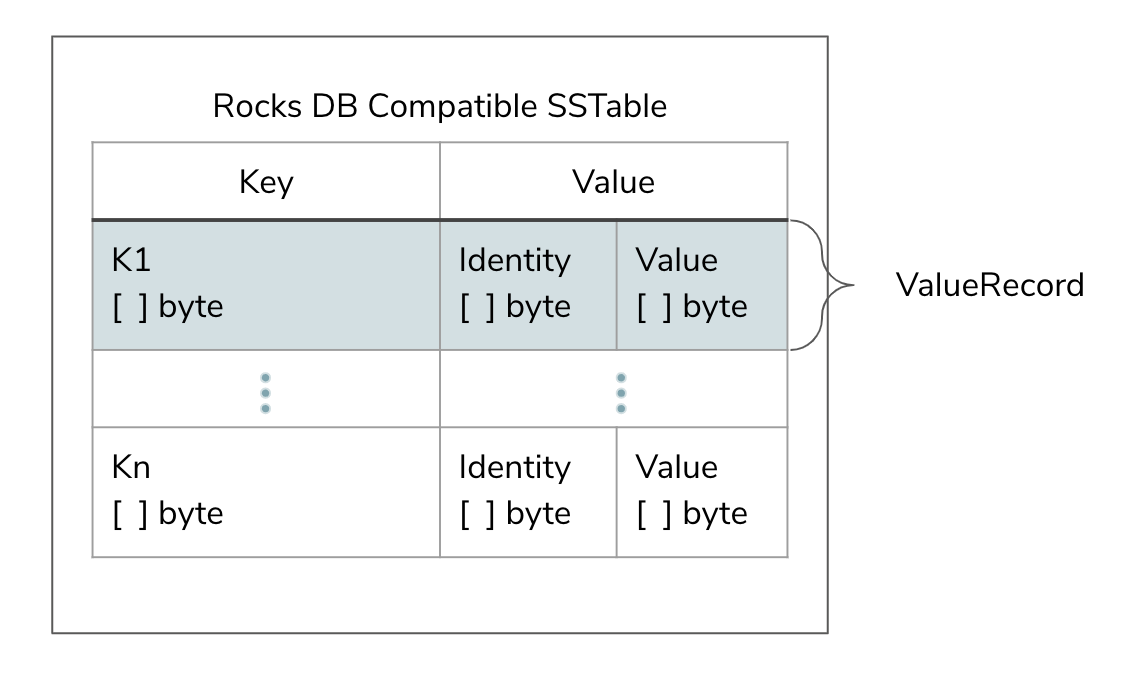
The Graveler file format
Each key/value pair (a ValueRecord) is constructed of a key, identity, and value. A simple identity could be a sha256 hash of the value's bytes, or any sequence of bytes that uniquely identifies the value. As far as the Graveler is concerned, two ValueRecords are identical if their key and identity fields are equal. A Graveler file is itself content-addressable, so as in Git the name of the file is its identity, calculated from the identity of the ValueRecords it contains:
valueRecordID = h(h(valueRecord.key) || h(valueRecord.Identity))
fileID = h(valueRecordID1 + … + valueRecordIDN)
Constructing a consistent view of the keyspace
The storage format has two additional requirements. Creating a commit should be space- and time-efficient, so that changing a single object out of a billion does not write a full snapshot of the repository, and instead reuses unchanged data files to keep the commit proportional to the size of the difference. A diff between commits should likewise run in time proportional to the size of their difference rather than their absolute sizes.
To support this, lakeFS builds a two-layer Merkle tree composed of leaf nodes (ranges) addressed by their content address, and a meta-range, a special range containing all ranges and thus representing an entire consistent view of the keyspace:
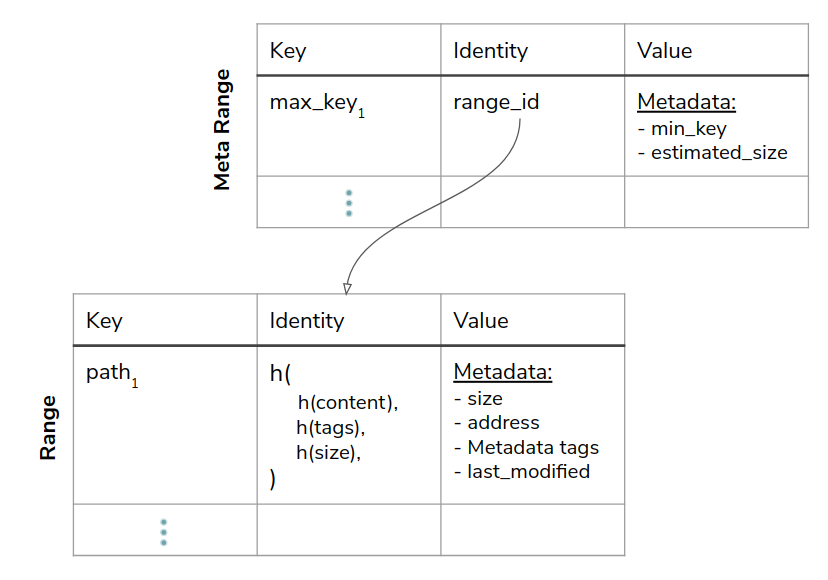
A meta-range points to the ranges that make up a commit
Assuming commit B is derived from commit A and only changed files in range e-f, it reuses every range except the one containing the modified keys, which is recreated with a new hash. That in turn creates a new meta-range, since its hash is derived from the hashes of all contained ranges. Assuming most commits change related objects that share a common prefix, the reuse ratio is very high. We tested this using S3 inventory from two design partners, partitioning the keyspace into simulated blocks and measuring their change over time, and saw a daily change rate of about 5-20%. At a modest 20 commits per day, a commit is expected to reuse at least 99% of the previous commit's blocks.
On the object store, ranges and meta-ranges are stored under the _lakefs/ prefix alongside the data objects:
<lakefs root>
    _lakefs/
        <range hash1>
        <range hash2>
        <range hashN>
        ...
        <metarange hash1>
        <metarange hash2>
        <metarange hashN>
        ...
    <data object hash1>
    <data object hash2>
    <data object hashN>
    ...
This relatively flat, fixed two-level hierarchy imposes no real limitation on the depth of the tree. A tree could be made recursive by having meta-ranges point to other meta-ranges while providing the same characteristics, but for simplicity lakeFS starts with two levels.
Representing references and uncommitted metadata
lakeFS always stores the object data in the storage namespace in the user's object store, for committed and uncommitted data alike. The lakeFS object metadata, however, might be stored in either the object store or a key-value store.
Unlike committed metadata, which is immutable, uncommitted (or "staged") metadata experiences frequent random writes and is very mutable. The same is true for refs, and in particular branches, which are pointers to an underlying commit that are modified on every commit or merge. Both types of metadata are mutable, require strong consistency guarantees, and must be fault tolerant, because if the current pointer of the main branch is unavailable then a large portion of the system is effectively down. Luckily this is a much smaller set of metadata than the committed metadata, and references and uncommitted metadata are stored on a key-value store (see supported databases) for those consistency guarantees.
Metadata Store
Starting at version 0.80.2, lakeFS moved all database operations off a tight coupling to PostgreSQL and onto a generic key-value store. SQL databases have obvious advantages, but the tight coupling to Postgres limited our users, so lakeFS over a key-value store was introduced.
The KV store implements a generic interface with methods for Get, Set, Compare-and-Set, Delete, and Scan. Each entry is represented by a [partition, key, value] triplet, where all three fields are generic byte arrays, giving the using module maximal flexibility over the format of each field. Under the hood the KV implementation relies on a backing database that persists the data. lakeFS ships drivers for DynamoDB and PostgreSQL, and users and contributors can develop their own driver for their database of choice. An in-memory KV store is available for experimentation, though it lacks persistence.
To store its metadata objects (repositories, branches, commits, tags, and uncommitted objects), lakeFS implements another layer over the generic KV store that serializes and deserializes these objects as protobuf. Because this layer relies only on the generic interface, it is agnostic to whichever store implementation is in use.
Further reading
For a deeper explanation, see the KV design document.
Optimistic locking with KV
One key difference between SQL databases and a key-value store is the ability to lock resources. To keep the KV interface simple and flexible in its choice of backing database, lakeFS chose not to support locking, which introduced concurrency challenges. Consider a common lakeFS flow, Commit, during which several database operations are performed: all relevant uncommitted objects for the branch are collected and marked as committed, a new commit object is created, and the branch is updated to point to the new commit.
This flow is very sensitive to concurrent execution, and if two commit flows run in parallel lakeFS must guarantee correctness. lakeFS with PostgreSQL simply locked the branch for the entire commit operation. With the KV store, lakeFS instead implements an optimistic locking algorithm that uses Compare-And-Set to remember the branch state at the start of the commit and to update the branch at the end only if it is unchanged. If the sampled and current states differ, another commit is in progress, so the first commit fails and gives the later one a chance to complete:
- Commit A sets the staging token to
tokenAand samples the branch. - Commit B sets the staging token to
tokenBand samples the branch. - Commit A finishes, tries to update the branch, and fails because the staging token is now
tokenBrather thantokenA. - Commit B finishes and updates the branch, since
tokenBmatches its expectation.
As a commit starts and sets a new staging token, the former value is added to a list of still-valid staging tokens (the sealed tokens) on the branch, ensuring no staging token and no object are lost due to a failed commit.
Transactions and atomic updates
Another difference is that PostgreSQL offers transactions while the KV store does not. lakeFS previously combined several updates into one atomic operation, where any failure rolled the whole operation back. Consider creating a new repository, which has three objects: the repository object itself, an initial branch, and an initial commit that the branch points to. With SQL this was a single transaction, and any failure rolled back cleanly.
Without transactions, a failure partway through could leave the repository without an initial branch while still being accessible. To mitigate this, lakeFS introduced a per-repository partition that holds all repository-related objects. The partition key is derived from the specific repository instance, and lakeFS first creates the commit and branch under that partition key and only then creates the repository, so the repository and its objects become accessible only after all three are created successfully. A failure might leave some dangling objects, but consistency is maintained, and the number of such objects is not expected to be significant.