Using lakeFS with Unity Catalog
Available in lakeFS Enterprise from v1.92.0. Start a free trial.
Note
Hooks that use the lakefs/catalogexport/delta_exporter module, or its alias delta_exporter_v1, available since lakeFS
v1.4.0, are deprecated and stop working on September 1, 2026. The examples on this page use delta_exporter_v2. Update
existing hooks before that date.
Overview
Databricks Unity Catalog is where teams discover, govern, and query the data assets spread across their workspaces. When your Delta Lake tables are versioned in lakeFS, the table versions you produce on a branch stay invisible from Databricks, so the branch isolation that makes lakeFS useful for experimentation also keeps your results out of the catalog your consumers already work in.
The Unity Catalog integration closes that gap by exporting a Delta Lake table from lakeFS and registering it in Unity Catalog as an external table. Each lakeFS branch becomes a schema in the catalog, so a consumer can query that branch's version of the table with ordinary SQL and browse it in Catalog Explorer alongside every other asset. The data is never copied out of lakeFS, and the registered table is read-only.
Exports run through a Lua hook, and you decide which event triggers it. Running on post-commit
refreshes the catalog on every commit to a branch, post-merge publishes only what has been merged, and
post-create-branch registers a branch's tables as soon as it exists.
Setting up table exports
Prerequisites
The hook writes the exported table metadata to your object store and then registers the table in Unity Catalog over a SQL warehouse, so it needs a working lakeFS repository on one side and a Databricks identity allowed to create external tables on the other. Have all of the following in place before you continue.
lakeFS and storage
- An active lakeFS installation with S3 or Azure ADLS Gen2 as the backing storage, holding the repository whose Delta Lake tables you want to export.
- lakeFS credentials with access to those Delta Lake tables and to the hook script.
- Storage credentials with write access to the repository's storage namespace.
Databricks
- Access to Unity Catalog, and a SQL warehouse the hook can run its registration statements against.
- A service principal with token usage permissions and an associated token.
The hook acts as that service principal whenever it registers a table, so grant it the following:
| Grant | Where to configure it |
|---|---|
Service principal: Manager over itself, with Workspace access and Databricks SQL access enabled |
Admin console → Service principals → <service principal> → Permissions → Grant access, and the same page's Configurations tab for the two access toggles |
Can use on the SQL warehouse |
SQL Warehouses → <SQL warehouse> → Permissions |
USE CATALOG, USE SCHEMA, and CREATE SCHEMA on the catalog |
Catalog → <catalog name> → Permissions → Grant |
CREATE EXTERNAL TABLE on an External Location |
Catalog → External Data → External Locations → Create location |
Define the table descriptor
A table descriptor is the YAML file that tells the exporter where a table's data lives in lakeFS and how to register it in
Unity Catalog. Because Unity Catalog addresses tables through a three-level namespace, every export resolves to
catalog.schema.table, where the catalog and table names come from the descriptor and the schema is the name of the branch
being exported. A famous_people table exported from main therefore lands at my-catalog-name.main.famous_people, and
the same table exported from an experiment branch appears beside it under that branch's own schema.
Define the table with at least these fields:
| Field | Description |
|---|---|
name |
The table name as it will be registered in Unity Catalog. |
type |
Must be delta, which selects the Delta Lake exporter. |
catalog |
The name of the Unity Catalog catalog to create the table in. |
path |
Where the Delta Lake table's data lives in lakeFS, relative to the root of the branch. |
Save the following as famous-people-td.yaml:
Tip
Name the catalog after your repository. Since the schema is already the branch name, a catalog that matches the
repository keeps the Unity Catalog namespace lined up with the lakeFS one, so repo.branch.table reads the same in both.
Table descriptors must be stored under the _lakefs_tables/ prefix in your repository, which is where the exporter looks for
them. The exporter discovers every descriptor stored there on its own, so exporting an additional table is a matter of
committing another descriptor file rather than editing the hook configuration.
Upload the table descriptor to _lakefs_tables/famous-people-td.yaml and commit:
lakectl fs upload lakefs://repo/main/_lakefs_tables/famous-people-td.yaml -s ./famous-people-td.yaml && \
lakectl commit lakefs://repo/main -m "add famous people table descriptor"
Configure the Unity Catalog exporter
The exporter is a Lua script that runs two steps in order. The Delta Lake exporter writes the table's metadata to your storage
namespace, and the Unity Catalog exporter takes that result and registers it as an external table. An action then ties the
script to a post-commit event so it runs on its own. The first two variants discover every table descriptor under
_lakefs_tables/ at run time, while the third exports a fixed list of tables passed through the action's args, which keeps
the script shorter and is useful when only some of your tables belong in the catalog.
Create unity_exporter.lua:
local databricks = require("databricks")
local lakefs = require("lakefs")
local extractor = require("lakefs/catalogexport/table_extractor")
local delta_exporter = require("lakefs/catalogexport/delta_exporter_v2")
local unity_exporter = require("lakefs/catalogexport/unity_exporter")

local descriptors = "_lakefs_tables"
local prefix = descriptors .. "/"

local entries = extractor.list_table_descriptor_entries(
        lakefs,
        action.repository_id,
        action.commit_id
)

local table_names = {}
for _, e in ipairs(entries) do
    table.insert(table_names, string.sub(e.path, #prefix + 1))
end

-- Describe the destination storage to export to:
local export_storage = {
    type = "s3",
    access_key_id = args.aws.access_key_id,
    secret_access_key = args.aws.secret_access_key,
    region = args.aws.region,
}

-- Export the Delta Lake log to the storage namespace:
local details = delta_exporter.export_delta_log(
        action,
        table_names,
        export_storage,
        nil,
        descriptors
)

-- Register the exported tables in Unity Catalog:
local databricks_client = databricks.client(args.databricks_host, args.databricks_token)
local registration_statuses = unity_exporter.register_tables(
        action,
        descriptors,
        details,
        databricks_client,
        args.warehouse_id
)

for t, status in pairs(registration_statuses) do
    print("Unity Catalog registration for table \"" .. t .. "\" completed with status: " .. status .. "\n")
end
local azure = require("azure")
local databricks = require("databricks")
local lakefs = require("lakefs")
local extractor = require("lakefs/catalogexport/table_extractor")
local delta_exporter = require("lakefs/catalogexport/delta_exporter_v2")
local unity_exporter = require("lakefs/catalogexport/unity_exporter")

local descriptors = "_lakefs_tables"
local prefix = descriptors .. "/"

local entries = extractor.list_table_descriptor_entries(
        lakefs,
        action.repository_id,
        action.commit_id
)

local table_names = {}
for _, e in ipairs(entries) do
    table.insert(table_names, string.sub(e.path, #prefix + 1))
end

-- Describe the destination storage to export to:
local export_storage = {
    type = "azure",
    storage_account = args.azure.storage_account,
    access_key = args.azure.access_key,
}

-- Export the Delta Lake log, rewriting paths to the abfss scheme:
local details = delta_exporter.export_delta_log(
        action,
        table_names,
        export_storage,
        nil,
        descriptors,
        azure.abfss_transform_path
)

-- Register the exported tables in Unity Catalog:
local databricks_client = databricks.client(args.databricks_host, args.databricks_token)
local registration_statuses = unity_exporter.register_tables(
        action,
        descriptors,
        details,
        databricks_client,
        args.warehouse_id
)

for t, status in pairs(registration_statuses) do
    print("Unity Catalog registration for table \"" .. t .. "\" completed with status: " .. status .. "\n")
end
local databricks = require("databricks")
local delta_exporter = require("lakefs/catalogexport/delta_exporter_v2")
local unity_exporter = require("lakefs/catalogexport/unity_exporter")

local descriptors = "_lakefs_tables"

-- Describe the destination storage to export to:
local export_storage = {
    type = "s3",
    access_key_id = args.aws.access_key_id,
    secret_access_key = args.aws.secret_access_key,
    region = args.aws.region,
}

-- Export the Delta Lake log to the storage namespace:
local details = delta_exporter.export_delta_log(
        action,
        args.table_defs,
        export_storage,
        nil,
        descriptors
)

-- Register the exported tables in Unity Catalog:
local databricks_client = databricks.client(args.databricks_host, args.databricks_token)
local registration_statuses = unity_exporter.register_tables(
        action,
        descriptors,
        details,
        databricks_client,
        args.warehouse_id
)

for t, status in pairs(registration_statuses) do
    print("Unity Catalog registration for table \"" .. t .. "\" completed with status: " .. status .. "\n")
end
Upload the lua script to the main branch under scripts/unity_exporter.lua and commit:
lakectl fs upload lakefs://repo/main/scripts/unity_exporter.lua -s ./unity_exporter.lua && \
lakectl commit lakefs://repo/main -m "upload unity exporter script"
Configure the export action
Define an action that runs the script above once a commit completes (post-commit) on the main branch. Any of the
supported hook events can drive an export, so pick the one that matches when your data becomes
ready to publish. Teams that only want reviewed data in the catalog usually export on post-merge from their main branch
instead.
Warning
Trigger the export on a post- event. A pre- event such as pre-commit runs before the change is finalized, so the
export succeeds but registers the table as it looked beforehand, without the data that commit is adding.
Create unity_exports_action.yaml, passing the storage credentials that match your repository's backing storage:
---
name: unity_exports
on:
  post-commit:
     branches: ["main"]
hooks:
  - id: unity_export
    type: lua
    properties:
      script_path: scripts/unity_exporter.lua
      args:
        aws:
          access_key_id: <AWS_ACCESS_KEY_ID>
          secret_access_key: <AWS_SECRET_ACCESS_KEY>
          region: <AWS_REGION>
        databricks_host: <DATABRICKS_HOST_URL>
        databricks_token: <DATABRICKS_SERVICE_PRINCIPAL_TOKEN>
        warehouse_id: <WAREHOUSE_ID>
---
name: unity_exports
on:
  post-commit:
     branches: ["main"]
hooks:
  - id: unity_export
    type: lua
    properties:
      script_path: scripts/unity_exporter.lua
      args:
        azure:
          storage_account: <AZURE_STORAGE_ACCOUNT>
          access_key: <AZURE_STORAGE_ACCESS_KEY>
        databricks_host: <DATABRICKS_HOST_URL>
        databricks_token: <DATABRICKS_SERVICE_PRINCIPAL_TOKEN>
        warehouse_id: <WAREHOUSE_ID>
---
name: unity_exports
on:
  post-commit:
     branches: ["main"]
hooks:
  - id: unity_export
    type: lua
    properties:
      script_path: scripts/unity_exporter.lua
      args:
        aws:
          access_key_id: <AWS_ACCESS_KEY_ID>
          secret_access_key: <AWS_SECRET_ACCESS_KEY>
          region: <AWS_REGION>
        table_defs: # descriptor file names under _lakefs_tables/, without the .yaml extension
          - famous-people-td
          - my-second-table-td
          - my-third-table-td
        databricks_host: <DATABRICKS_HOST_URL>
        databricks_token: <DATABRICKS_SERVICE_PRINCIPAL_TOKEN>
        warehouse_id: <WAREHOUSE_ID>
Upload the action configuration to _lakefs_actions/unity_exports_action.yaml and commit:
lakectl fs upload lakefs://repo/main/_lakefs_actions/unity_exports_action.yaml -s ./unity_exports_action.yaml && \
lakectl commit lakefs://repo/main -m "add unity export action"
Note
From this commit onward, every commit to main runs the exporter. Since the script narrows the export to tables that
changed in the commit, this commit touches no table and exports nothing, and the first real export happens on the commit
you make in the next step.
Write the Delta Lake table to lakeFS
With the exporter and its action in place, writing to the table is what triggers an export. Write the table with whichever
engine you prefer, at the same path the descriptor's path field points to. The example below uses Spark over the
lakeFS S3 gateway:
pyspark --packages "io.delta:delta-spark_2.12:3.0.0,org.apache.hadoop:hadoop-aws:3.3.4,com.amazonaws:aws-java-sdk-bundle:1.12.262" \
  --conf spark.sql.extensions=io.delta.sql.DeltaSparkSessionExtension \
  --conf spark.sql.catalog.spark_catalog=org.apache.spark.sql.delta.catalog.DeltaCatalog \
  --conf spark.hadoop.fs.s3a.aws.credentials.provider='org.apache.hadoop.fs.s3a.SimpleAWSCredentialsProvider' \
  --conf spark.hadoop.fs.s3a.endpoint='<LAKEFS_SERVER_URL>' \
  --conf spark.hadoop.fs.s3a.access.key='<LAKEFS_ACCESS_KEY>' \
  --conf spark.hadoop.fs.s3a.secret.key='<LAKEFS_SECRET_ACCESS_KEY>' \
  --conf spark.hadoop.fs.s3a.path.style.access=true
data = [
   ('James','Bond','England','intelligence'),
   ('Robbie','Williams','England','music'),
   ('Hulk','Hogan','USA','entertainment'),
   ('Mister','T','USA','entertainment'),
   ('Rafael','Nadal','Spain','professional athlete'),
   ('Paul','Haver','Belgium','music'),
]
columns = ["firstname","lastname","country","category"]
df = spark.createDataFrame(data=data, schema = columns)
df.write.format("delta").mode("overwrite").partitionBy("category", "country").save("s3a://repo/main/tables/famous-people")
Commit the data, which fires the post-commit hook:
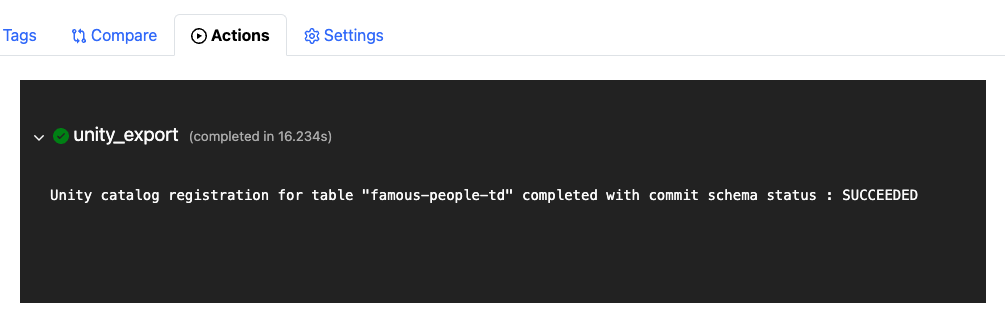
The action exports the famous_people Delta Lake table to the repository's storage namespace and registers it as an external
table in Unity Catalog under the catalog my-catalog-name, the schema main after the branch it was exported from, and the
table name famous_people, giving you my-catalog-name.main.famous_people. Once the run is finished, you can follow it in the lakeFS UI:
Interact with exported tables
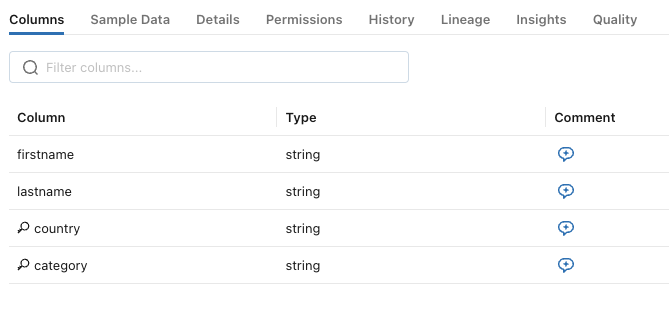
Once the table is registered, it behaves like any other external table in Unity Catalog, so you can
query it with whichever Databricks tool you already use and browse it in
Catalog Explorer under my-catalog-name.main.famous_people. To inspect its definition from the Databricks CLI, run:
What Databricks sees is the table as of the commit the hook ran on, so work you have not committed yet stays out of the
catalog and the table refreshes on your next commit. Because the export is read-only, keep writing through lakeFS and let the
hook bring the catalog up to date. Every exported branch gets its own schema, though only the branches your action's
branches filter covers are exported, which means a new branch appears in the catalog once an action covers it.
Delta Lake export compatibility
An exported table keeps the Delta Lake features it was written with, so what your consumers query in Databricks behaves like the table in lakeFS. Support covers the full set of table features the Delta protocol defines at reader version 3 and writer version 7, apart from the exclusions described below. Databricks lists the versions each feature requires in Delta Lake feature compatibility and protocols.
Supported table features
Reader-writer features change how a table is read as well as written, so both engines have to understand them:
| Reader-writer feature |
|---|
columnMapping |
deletionVectors |
timestampNtz |
typeWidening |
v2Checkpoint |
vacuumProtocolCheck |
variantType |
variantShredding |
geospatial |
Writer-only features affect writes alone, and a reader that ignores them still sees correct data:
| Writer-only feature |
|---|
appendOnly |
invariants |
checkConstraints |
changeDataFeed |
generatedColumns |
identityColumns |
rowTracking |
clustering |
domainMetadata |
inCommitTimestamp |
checkpointProtection |
allowColumnDefaults |
materializePartitionColumns |
collations |
The exporter also accepts the preview and development spellings that engines wrote before some of these features were ratified
under their final names, among them typeWidening-preview, variantType-preview, variantShredding-preview,
inCommitTimestamp-preview, collations-preview, and geospatial-dev, so a table written by an older engine still exports.
Features excluded by design
The remaining features are excluded on purpose, either because lakeFS gives you a better path for that kind of table or because the table falls outside what an export covers:
| Excluded feature | Reason |
|---|---|
icebergCompatV1, icebergCompatV2, icebergCompatV3, icebergWriterCompatV1, icebergNativeV4 |
These features exist to expose a Delta table to Iceberg readers, and lakeFS already has a first-class path for Iceberg tables through the Iceberg REST Catalog. Use that rather than exporting a Delta table for Iceberg compatibility. |
catalogManaged, catalogOwned-preview, coordinatedCommits-preview |
These declare a table whose lifecycle a catalog owns. lakeFS does not support managed tables, and only external tables can be exported. |
Exclusion is per table rather than per run. When the exporter meets a table declaring one of these features it skips that
table, prints skipping <table>: unsupported table feature, and carries on with the others, so one incompatible table does not
hold up the rest of the export.
Features that are not recognized
A table can also declare a feature that appears in neither list above, which happens when it was written by an engine using a
Delta feature newer than the ones the exporter tracks. These tables are exported anyway, since most features need no particular
handling for the export to produce a correct log, and the hook log records that the table
declares delta features not known to this exporter. Treat that as a sign the feature has not been verified yet rather than
that the table is broken.
Let us know which feature you are using so it can be reviewed and added to the supported set.
Limitations
- Exports are supported on AWS S3 and Azure ADLS Gen2 only.
- Delta Lake tables in lakeFS support a single writer, described under the Delta Lake limitations.
Further reading
For a walkthrough of the same setup with screenshots of each Databricks step, see
lakeFS + Unity Catalog Integration: Step-by-Step Tutorial
on the lakeFS blog. The Data Catalog Exports guide covers the other exporters that share this
mechanism, and the Lua hooks reference documents the
unity_exporter and delta_exporter functions used above.