Metadata Search
Available in lakeFS Team and lakeFS Enterprise. Start a free trial or contact us.
Note
lakeFS Metadata search is currently in private preview for lakeFS Enterprise customers. Contact us to get started!
Overview
lakeFS Metadata Search makes large-scale data lakes easily searchable by object metadata, while adding the power of versioning to search. This enables reproducible queries which are essential in collaborative and ML-driven environments where data evolves constantly and metadata is key to making informed decisions.
With Metadata Search, you can query object metadata by both:
- System metadata: Automatically captured properties such as object path, size, last modified time, and committer.
- User-defined metadata: Custom labels, annotations, or tags stored as lakeFS object metadata, typically added during ingestion, processing, or curation.
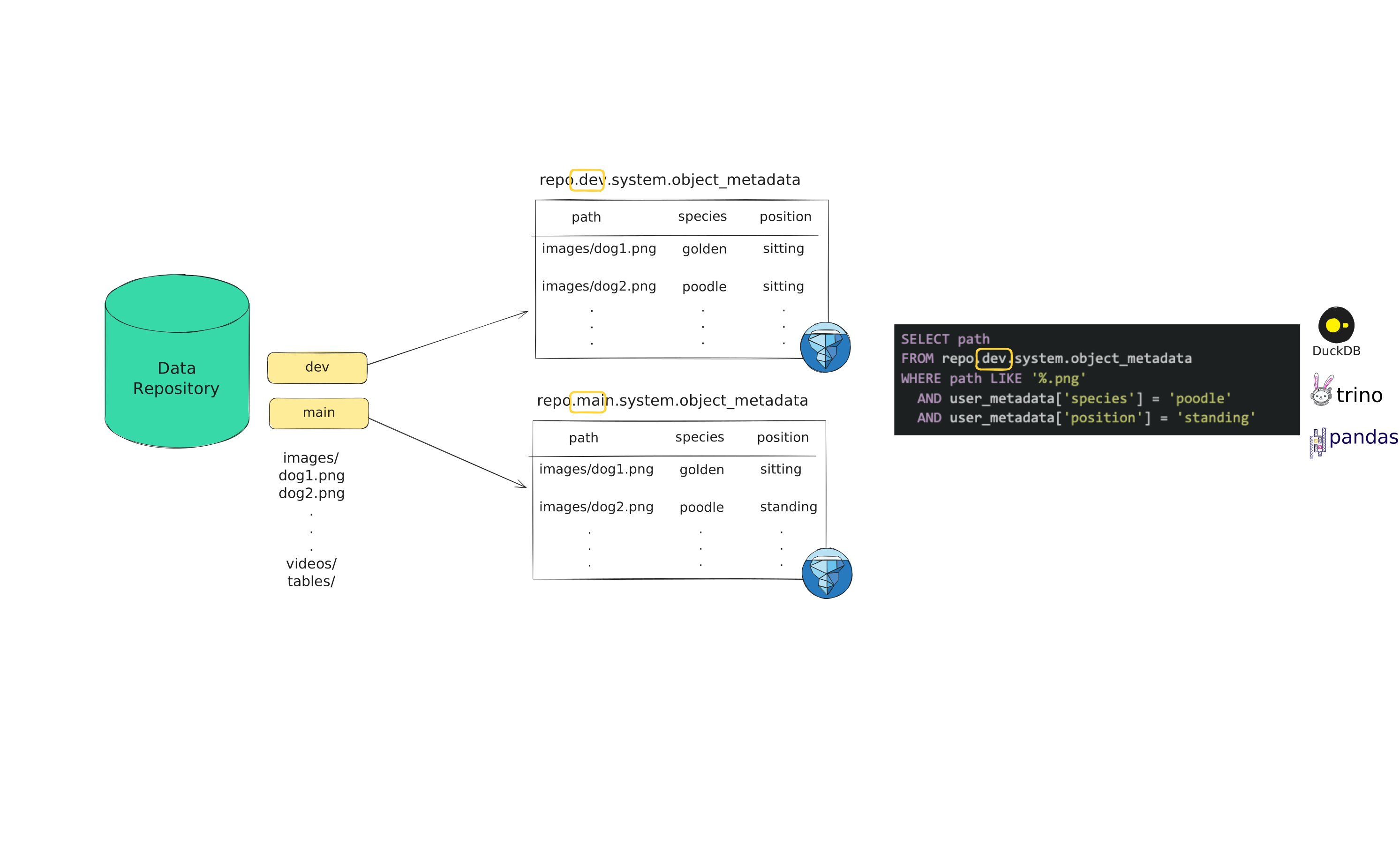
To enable simple and scalable search, lakeFS exposes object metadata as versioned Iceberg tables, fully compatible with clients like DuckDB, PyIceberg, Spark, Trino, and others - enabling fast, expressive queries across any lakeFS version. See How It Works for details. lakeFS Enterprise also lets you run the same SQL from the lakeFS Web UI without setting up a client of your own.
Benefits
- Scalable: Search metadata across millions or billions of objects.
- Query Reproducibility: Run metadata queries against specific commits or tags for consistent results.
- No infrastructure burden: lakeFS manages metadata collection and indexing natively: no need to build, deploy or maintain a separate metadata tracking system.
Use cases
- Data Discovery & Exploration: Quickly find relevant data using flexible filters (e.g., annotations, object size, timestamps).
- Data Governance: Audit metadata tags, detect sensitive data (like PII), and ensure objects are properly labeled with ownership or classification to support internal policies and external compliance requirements.
- Operational Troubleshooting: Filter and inspect data using metadata like workflow ID or publish time to trace lineage, debug pipeline issues, and understand how data was created or modified - all within a specific lakeFS version.
How it Works
lakeFS Metadata Search is built on top of lakeFS Iceberg support, using catalog-level system tables to manage and expose versioned object metadata for querying.
Metadata Search works by enabling metadata indexing on selected repositories and branches (see Configuration). Once configured, lakeFS automatically:
- Creates a metadata repository for each selected data repository, following the naming convention:
<repo>-metadata, whererepois the data repository id. - Creates matching branches in the metadata repository for each configured branch in the data repository. For example, a
devbranch in data repositorymy-repo, will have a correspondingdevbranch inmy-repo-metadata. - Maintains a versioned Iceberg object metadata table on each matching branch in the metadata repository.
- Continuously syncs metadata via a background processing pipeline that keeps the object metadata tables eventually consistent with changes in the corresponding data repository branches.
- Wraps the lakeFS Iceberg REST catalog to translate table queries issued against data repository references (branches, commits, or tags) and resolve them to the corresponding tables in the metadata repository. This indirection allows metadata queries to be expressed entirely in the data repository namespace, while lakeFS handles the mapping to the underlying metadata storage.
Querying Metadata
Metadata queries are always performed through the data repository namespace, not the metadata repository that lakeFS manages internally. You can query metadata by:
- Branch name:
<repo>.<branch>.system.object_metadata, to search the latest metadata state on a given branch. - Commit ID:
<repo>.<commit_id>.system.object_metadata, to retrieve the metadata snapshot at a specific commit. - Tag name:
<repo>.<tag_name>.system.object_metadata, to retrieve the metadata snapshot at a tagged commit.
Tip
Using commit IDs or tags ensures reproducible queries , letting you always access the exact metadata state from an immutable point in time.
Queries are executed through the lakeFS Iceberg REST catalog, which is fully compatible with standard engines like Trino, DuckDB, Spark, PyIceberg, and others. You can either connect an engine of your own to the catalog, or search from the lakeFS Web UI, where lakeFS runs the query on the server.
Info
You can use Metadata Search even without a license for full Iceberg support in lakeFS. The feature relies on the lakeFS-managed Iceberg REST catalog for querying object metadata, but it can work side-by-side with any other catalog you use to manage additional Iceberg tables.
Object Metadata Table Schema
Each row in the lakeFS object metadata table represents the latest metadata version for a given object on the corresponding branch. The table contains at most one row per object, ensuring that query performance remains consistent and predictable.
| Column name | Required | Data Type | Description |
|---|---|---|---|
| repository | yes | string | The name of the repository where the object is stored. |
| path | yes | string | The unique path identifying the object within the repository. |
| commit_id | yes | string | The latest commit ID where the object was added or modified. |
| size_bytes | yes | Long | The object's size in bytes. |
| last_modified | yes | Timestamp | The time the object was last modified. |
| etag | yes | string | The object’s ETag (content hash). This reflects changes to the object's content only, not its metadata. |
| user_metadata | no | Map |
User-defined metadata (e.g., annotations, tags). If none exists, an empty map is stored. |
| committer | no | string | The user who committed the object’s latest change. |
| content_type | no | string | The MIME type of the object (e.g., application/json, image/png). |
| creation_date | no | Timestamp | The creation time of the commit recorded in commit_id. |
Consistency
lakeFS object metadata tables are eventually consistent, which means that it may take up to a few minutes for newly committed objects to become searchable. Metadata becomes searchable atomically — either all object metadata from the commit is available, or none of it is. Commits are processed sequentially: a child commit will only be processed after its parent has been fully ingested.
Tip
To check whether the most recent state of your branch is available for metadata search queries, check if the following query returns results:
Getting Started
Configuration
lakeFS Metadata Search runs as a separate service that integrates with your lakeFS server.
If you are self-hosting lakeFS Enterprise:
- Contact us to get a Metadata Search license.
- Add the configuration below to your Helm values file.
- Install or upgrade the Helm chart with the updated configuration.
Note
From lakefs Helm chart version 1.10.0, the Metadata Search
service runs on the treeverse/lakefs-enterprise image (invoked as lakefs mds run) instead of the
legacy standalone treeverse/mds image. The chart's mds.config block uses the schema documented
below.
Upgrading to chart >= 1.10.0 from an earlier version: the configuration schema changed.
Existing installations must migrate their mds.config to the new keys (e.g. lakefs.endpoint →
metadata_search.lakefs_mds_endpoint, lakefs.secret_access_key → metadata_search.secret_key,
and the metadata_settings.* keys move under metadata_search) before upgrading.
If you are using lakeFS Cloud:
Contact us to enable the feature. We’ll request the information included in the sample configuration below.
The Metadata Search service requires:
- lakeFS server connection settings: so the service can communicate with your lakeFS instance.
- Metadata-specific settings: to control how metadata is captured and which repositories and branches are searchable.
Configuration Reference
All settings live under the top-level metadata_search key.
lakefs_mds_endpoint(string : "")- the lakeFS server endpoint. Required.access_key_id(string : "")- a lakeFS access key.secret_key(string : "")- a lakeFS secret key.listen_address(string : "0.0.0.0:8080")- HTTP listen address serving the service's operational endpoints (/_health,/metrics, and/_pprof/).period(duration : 60s)- interval between metadata-collection passes.concurrency(int : 25)- number of branches processed in parallel.max_commits(int : 1000)- the maximum number of commits to process per searchable branch.since(string : "")- RFC 3339 timestamp (e.g.,2025-01-01T00:00:00Z) that sets the earliest point in time from which to process commits for metadata extraction. If omitted, metadata is captured from the time the branch was created.repositories(map[string]repo : {})- mapping of repositories to per-repository settings. Metadata search activates when this map is non-empty. You can specify full branch names or use branch prefixes for flexibility. Prefixes should be expressed using a trailing asterisk, e.g.,dev-*.repositories.<name>.branches([]string : [])- branch names (or prefixes) whose object metadata should be searchable.repositories.<name>.storage_namespace(string : "")- optional storage namespace override for the generated<repo>-metadatarepository. If omitted, lakeFS picks one based on the data repository's namespace.
Note
Metadata search is disabled by default. You must explicitly configure which repositories and branches to include.
Tip
Use branch name prefixes (e.g., feature-*) to reduce the need for manual updates when new branches are added.
Validation (chart 1.10.0+)
On lakefs Helm chart version 1.10.0 and later, the
Metadata Search service refuses to start unless lakefs_mds_endpoint is non-empty and period,
concurrency, and max_commits are all positive (period > 0, concurrency >= 1, max_commits >= 1).
Unlike earlier versions, max_commits: 0 is no longer accepted to disable the per-branch limit.
Sample Configuration
Example
metadata_search:
  lakefs_mds_endpoint: "https://example.lakefs.io/mds/iceberg/api"
  access_key_id: "AKIAIOSFOLEXAMPLE"
  secret_key: "wJalrXUtnFEMI/K7MDENG/bPxRfiCYEXAMPLEKEY"
  period: 60s
  concurrency: 25
  max_commits: 1000
  since: "2025-01-01T00:00:00Z"
  repositories:
    example-repo-1:
      branches:
        - main
        - dev
    example-repo-2:
      branches:
        - main
        - feature-*
Searching from the lakeFS Web UI
Connecting an Iceberg client of your own is the right choice for querying metadata from pipelines and notebooks, but
often you only want a quick answer about a branch, such as which objects carry a label or how much data a commit added. For these questions, lakeFS
Enterprise lets you run SQL over the object_metadata tables from the Metadata Search tab of the lakeFS Web UI, with
no client, catalog configuration, or credentials to manage.
On lakeFS Cloud, contact us to add Metadata Search to your license; lakeFS then runs the query service for you. If you run lakeFS Enterprise self-managed, see Metadata Search Web UI for Self-Managed Installations to enable it.
Using the Metadata Search Tab
Open a repository in the lakeFS Web UI and select the Metadata Search tab. The tab is made of three parts:
- A ref selector at the top left, listing the repository's branches.
- A SQL editor, pre-filled with a default preview query for the selected branch.
- An Execute button (or Ctrl+Enter / Cmd+Enter) followed by a results grid, which shows the first 1,000 rows of the
result along with the total number of rows the query returned. Timestamps are shown in UTC and the
user_metadatamap is rendered as JSON.
The default query looks like this:
-- Metadata for my-repo @ main.
SELECT path, user_metadata, content_type, last_modified, size_bytes, committer, commit_id, etag, creation_date
FROM "my-repo.main.system".object_metadata
LIMIT 20;
Tables are addressed as "<repo>.<ref>.system".object_metadata, where <ref> is a branch, a tag, or a commit ID
whose metadata has been synced, and the namespace must stay double-quoted because it contains dots. Since the query service runs
DuckDB, write your filters in
DuckDB SQL, and access user-defined metadata with the map syntax
user_metadata['key'], exactly as in the example queries below. The ref selector lists the
repository's branches, so to query a tag or a commit, type it into the table name yourself, and remember that immutable refs
are what make a query reproducible.
Querying Across Repositories and Refs
A single query may reference several object_metadata tables, from different refs of the same repository or from
different repositories, which is how you compare versions or search an entire lake at once. The ref is not stored as a
column, so label each table when you combine them:
SELECT repository, ref, path, size_bytes, user_metadata
FROM (
  SELECT *, 'main' AS ref FROM "my-repo.main.system".object_metadata
  UNION ALL
  SELECT *, 'v1.2.0' AS ref FROM "my-repo.v1.2.0.system".object_metadata
)
WHERE user_metadata['animal'] = 'cat'
LIMIT 100;
Set operations work the same way. This query lists the objects that exist on main but were not part of the v1.2.0
release:
SELECT path
FROM "my-repo.main.system".object_metadata
EXCEPT
SELECT path
FROM "my-repo.v1.2.0.system".object_metadata;
Keep in mind that a query scans every table it names, so combining several large tables costs the sum of their sizes and can run into the limits below.
Permissions
Running a query requires the fs:ReadRepository action on every repository the query references, checked on the
resource arn:lakefs:fs:::repository/<repo>. A caller missing this permission on any one of the repositories has the
whole query rejected. Because fs:ReadRepository is part of the standard read policies, anyone who can browse a
repository in the Web UI can also search its metadata, and no access to the <repo>-metadata repository is needed, unlike
when you connect your own engine to the catalog.
Note that this permission covers the metadata of all objects on all refs of the repository: branch-level and object-level policies do not narrow what a metadata query can see. Every query is recorded in the lakeFS audit log with the repositories it referenced.
Query Rules and Limits
The query service wraps your SQL as SELECT * FROM (<your SQL>) AS q LIMIT <cap> to enforce its row cap, so the query must be a
single SELECT-shaped statement, and a parse error quotes the wrapper rather than your text.
The following shapes work:
- A single
SELECT, includingWITHclauses,ORDER BY, and aLIMITorOFFSETof your own. VALUES, DuckDB's FROM-first syntax, and the inspection statementsSHOW TABLES,DESCRIBE, andSUMMARIZE.- A trailing
;on its own, or a trailing comment without a;before it.
These fail:
- More than one statement, such as
SELECT 1; SELECT 2. - A trailing
;followed by a comment, such asSELECT 1; -- done. EXPLAIN,PRAGMA,SET,CREATE TABLE,COPY, and any other statement that is not aSELECT.- Any table other than the
object_metadatatables the query names. - Any function outside the supported set. The set covers common aggregate, string, numeric, date, conditional, and
window functions; file- or table-reading functions (such as
read_csv) and session or identity functions (such asCURRENT_USER) are rejected. - Other advanced constructs the validator does not allow, among them
GROUPING SETS/ROLLUP/CUBE, row constructors,JSON/XMLconstructors,TABLESAMPLE,SELECT INTO, row-locking clauses, and query parameters. This list is not exhaustive: anything that is not a plain read-onlySELECTover theobject_metadatatables is rejected.
Each query also runs under fixed limits built into the query service (their exact values can change between releases):
- Result row cap: the result is capped at a fixed number of rows; any rows beyond the cap are dropped from the returned result.
- Result byte cap: a result above the size cap fails the query, so select fewer columns or add a
LIMIT. - Time budget: the query service caps how long a single query may run, and the whole call must also finish within the lakeFS server's
iceberg_query.request_timeout(which self-managed installations can configure). - Column types: results are encoded as Parquet, so every column you select must be a type Parquet can store. A DuckDB type with no Parquet equivalent, such as
INTERVAL, makes the query fail. Return it as text (CAST(expr AS VARCHAR)) or compute a plain number instead (for exampledate_diff('day', a, b)). - Rows displayed: the Web UI renders the first 1,000 rows of the result, alongside its total row count.
- Concurrency: the query service runs one query at a time for the whole installation. If another query is still running, the Metadata Search tab shows "Another metadata query is running. Try again shortly." and does not retry the query on its own.
Web UI Search Limitations
- S3 only: Azure, GCS, and non-S3 repositories in multi-storage backend installations can still query through the Iceberg REST catalog.
- Selective queries: the metadata tables are unpartitioned and unsorted, so very large tables or multi-table unions may time out.
- Eventual consistency: new commits become searchable only after the Metadata Search service syncs them.
- Experimental API: the
mds/queryendpoint may change in a future release.
How to Search by Metadata
Tip
For interactive searches, the Metadata Search tab in the lakeFS Web UI is now the simpler option, since it needs no client setup, catalog configuration, or credentials. Connect an engine of your own, as described below, when you query from pipelines or notebooks, need results beyond the Web UI limits, or run on a storage backend the query service does not support yet.
To search by object metadata in lakeFS, query the Iceberg object_metadata tables that lakeFS automatically creates and
manages. These tables are always available under the data repository namespace:
You can use any Iceberg-compatible engine, such as DuckDB, Trino, Spark, PyIceberg, or others.
If you're using DuckDB, note the Iceberg REST Catalog guide for
details on how to reference object_metadata tables.
Requirements
Your Iceberg client must meet the authorization requirements of the lakeFS Iceberg REST catalog. To perform metadata search queries, ensure users have access to the appropriate metadata repository (see How it Works).
Metadata Key Casing with S3 Gateway
When objects are uploaded through the S3 Gateway, user-defined metadata keys are stored with the X-Amz-Meta- prefix,
and the key itself is lowercased in line with the
S3 specification.
For example, uploading an object with metadata key MyKey through the S3 Gateway stores X-Amz-Meta-mykey in the
user_metadata map, so query it as user_metadata['X-Amz-Meta-mykey']. Metadata set through the lakeFS API is stored
without the prefix — the same upload would be queried as user_metadata['mykey'].
Authentication
lakeFS automatically creates a dedicated service user called mds-service-user with a read-only policy that grants
the minimum permissions needed for metadata search queries. To use it:
- Create credentials for the
mds-service-userin the lakeFS API / lakectl / Web UI. - Use the generated access key and secret key when initializing the Iceberg catalog (see Search Steps below).
Using this service user ensures that metadata-search clients have least-privilege access to the Iceberg metadata tables.
Note
You can also use any other lakeFS user that has read access to both the data repository and its corresponding metadata repository.
Search Steps
- Initialize lakeFS Iceberg catalog, and authenticate. The following example uses PyIceberg:
- Load the object metadata table that represents the reference you would like to query.
- Use SQL to search by system or user-defined metadata.
Here’s an example using PyIceberg and DuckDB:
Requirements
This requires duckdb to be installed.
from pyiceberg.catalog import load_catalog

# Initialize the catalog
catalog = RestCatalog(name = "my_catalog", **{
    'prefix': 'lakefs',
    'uri': 'https://lakefs.example.com/mds/iceberg/api',
    'oauth2-server-uri': 'https://lakefs.example.com/mds/iceberg/api/iceberg/api/v1/oauth/tokens',
    'credential': f'AKIAlakefs12345EXAMPLE:abc/lakefs/1234567bPxRfiCYEXAMPLEKEY',
})

# `repo` is the repository name we would like to search
con = catalog.load_table('repo.main.system.object_metadata').scan().to_duckdb('object_metadata')

query = f"""
SELECT path
FROM object_metadata
WHERE user_metadata['animal'] = 'cat'
  AND last_modified > (now() - INTERVAL '20 days')
"""

df = con.execute(query).df()
This query finds all newly added cat images (added in the past week), demonstrating how you can combine user-defined and system metadata fields in powerful, version-aware searches.
Note
This catalog initialization differs from the classic lakeFS Iceberg catalog.
Notice the additional mds path segment in the endpoints, which routes requests through the Metadata Search catalog.
Writing Reproducible Queries
In collaborative environments or during iterative development, it's important to ensure that metadata queries return consistent, reproducible results. To achieve this, you should query object metadata tables using commit IDs or tag names, which are immutable references, instead of branch names.
Why not use Branch names?
Querying metadata tables using a branch name, e.g., repo.main.system.object_metadata return results based on
the state of the branch’s HEAD commit at the time of the query, assuming the metadata has already been ingested (within
eventual consistency constraints). However, because branch heads are mutable and advance with each new
commit, the results of such queries can change over time.
Use commit ID or tag name for stability
To ensure stability and reproducibility, use lakeFS commit IDs or tag names in your queries. Each commit or tag created on the data repository reference a specific, fixed snapshot of the repository state, including its metadata. This guarantees that the same query always returns the same results, regardless of subsequent changes to the branch.
Using Commit ID
- Identify the relevant commit ID from the data repository (e.g.,
dc3117ec3a727104226c896bf7ab9350ee5da06ae052406262840e9a4a8c9ffbon branchdevin repomy-repo). - Query the object metadata table using the following pattern:
Examples:
Both table paths return the metadata for commit
my-repo.dc3117e.system.object_metadata my-repo.dc3117ec3a727104226c896bf7ab9350ee5da06ae052406262840e9a4a8c9ffb.system.object_metadatadc3117ec3a727104226c896bf7ab9350ee5da06ae052406262840e9a4a8c9ffb.
Tip
For readability, prefer using the short commit SHA (e.g., dc3117e).
Using Tag Name
- Identify the relevant tag from the data repository (e.g.,
v0.2.1on branchmainin repomy-repo). - Query the object metadata table using the following pattern: Examples:
Tip
For end-to-end reproducibility, include the commit ID or tag name directly in your queries, and version those queries with Git.
Example Queries
This section showcases how to use lakeFS Metadata Search to answer different types of questions using standard SQL.
For simplicity and readability, the examples are written in Trino SQL. If you're using another engine (e.g., DuckDB, Spark, or PyIceberg), you may need to adjust the syntax accordingly.
The examples below use branch names as references for simplicity. However, for reproducible results, it is recommended to use commit IDs or tag names instead. You can convert any example into a reproducible query by replacing the branch reference accordingly.
Object Annotation and Labeling
Filter by Object Labels
The following example returns images labeled as dogs that are not in a sitting position:
USE "repo.main.system";

SELECT * FROM object_metadata
WHERE path LIKE `%.jpg`
  AND user_metadata['animal'] = 'dog'
  AND user_metadata['position'] != 'sitting';
View Metadata from AI-Powered Annotators
Assume that any object annotated by an AI-powered tool includes the object metadata key-value pair source: autolabel to
indicate its origin. The following example returns all such AI-annotated objects:
File Properties and Storage
Filter by File Extension & Size
Find all .png files larger than 2MB.
USE "repo.main.system";

SELECT *
FROM object_metadata
WHERE path LIKE '%.png'
  AND size_bytes > 2000000;
Filter objects by addition Time
This example finds all objects added in the last 7 days.
USE "repo.main.system";

SELECT *
FROM object_metadata
WHERE last_modified >= current_timestamp - interval '7' day;
Measure How Much Data a Commit Wrote
To total the data one commit wrote, query that commit's own snapshot and sum size_bytes. Rewrites count at full size.
USE "repo.<full-commit-id>.system";

SELECT sum(size_bytes) AS bytes_written
FROM object_metadata
WHERE commit_id = '<full-commit-id>';
Audit and Governance
Detect Errors in Sensitive Data Tagging
Assume all objects under customers/ must have user metadata PII=true.
This example returns objects where PII=false, or PII key is missing.
USE "repo.main.system";

SELECT *
FROM object_metadata
WHERE path LIKE 'customers/%'
  AND (
    user_metadata['PII'] = 'false'
        OR user_metadata['PII'] IS NULL
    );
Metadata Search Web UI for Self-Managed Installations
The Metadata Search tab of the lakeFS Web UI runs its queries on the Metadata Search query service, a separate pod that the lakeFS server calls for every query. The query service reads the tables that the Metadata Search configuration syncs, so that configuration needs no further changes. To enable the tab on a self-managed lakeFS Enterprise installation:
- Contact us to get a Metadata Search license.
- Prepare the object store as described in Object Store Prerequisites.
- Deploy the query service with the
lakefsHelm chart, version 1.12.42 or later, as described in the chart's README. - Add the Iceberg Query Service configuration to your lakeFS server configuration.
How the Metadata Search Query Service Works
Searching from the Web UI adds one component to your deployment: the Metadata Search query service, a separate pod that runs the queries with an embedded DuckDB engine and reads the metadata tables directly from object storage. The lakeFS server stays in front of it and handles everything else, including authentication, RBAC, audit logging, and handing the pod short-lived credentials for only the tables a query may read, so the pod itself holds no access to your data. Results are written as Parquet files to an object store location you choose; the lakeFS server reads each result back with its own credentials and streams it to the Web UI.
flowchart LR
  UI["lakeFS Web UI"] -->|SQL| SRV["lakeFS server<br/>auth, RBAC, credentials"]
  SRV -->|authorized query| POD["Query Service pod<br/>DuckDB"]
  POD -->|read| OM[("object_metadata tables")]
  POD -->|write| RES[("results location")]
  SRV -->|read result| RES
  SRV -->|stream result| UI
The Metadata Search query service: the lakeFS server authorizes each query and forwards it to the query service pod, which reads the metadata tables and writes the result, which the lakeFS server then reads back and streams to the Web UI.
Object Store Prerequisites
- Credentials vending: set
blockstore.s3.credentials_vending.role_arnas described under Credentials Vending, and allow the vending role to read the storage namespaces of your<repo>-metadatarepositories. Vending is S3 only, so the query service is S3 only as well. - Results location: an S3 prefix that the lakeFS server's identity can read and write, not nested inside a repository
storage namespace (a separate prefix in the same bucket is fine), such as
s3://my-bucket/lakefs-mds-results. Each result is stored beneath it at_lakefs/mds_query/results/<query_id>.parquet. - Lifecycle rule: expires objects under
<results location>/_lakefs/mds_query/results/, since nothing else deletes result files.
Warning
Scope the lifecycle rule to exactly the _lakefs/mds_query/results/ prefix under your results location. A rule on
a broader prefix would expire unrelated objects.
Iceberg Query Service Configuration Reference
All settings below live under the top-level iceberg_query key of the lakeFS server configuration. When you deploy with
the lakefs Helm chart you do not write this block by
hand: you set a few chart values and the chart writes the matching iceberg_query config for you (see
Deploying with the Helm chart).
enabled(bool : false)- enables the query endpoints and the Metadata Search tab.endpoint(string : "")- the base URL of the query service, e.g.,http://<query-service-host>:8080. Required.token(string : "")- the shared secret the lakeFS server presents to the query service on every call. Required.results_location(string : "")- the results location from the prerequisites above. Required.results_storage_id(string : "")- on a multi-storage backend installation, the blockstore that holds the results location. If omitted, the single or default blockstore is used.request_timeout(duration : 30s)- how long the server waits for a query to finish. Keep it below the idle timeout of any load balancer in front of lakeFS.
Note
The query service is disabled by default. Once enabled is set, the lakeFS server refuses to start unless
endpoint, token, and results_location are all set. With the Helm chart you provide only the results location
(iqs.resultsLocation) and the shared token (secrets.iqsToken); the chart fills enabled and endpoint (the
in-cluster query service URL) for you, while request_timeout (30s) and results_storage_id (the default
blockstore) keep their defaults unless you override them.
Deploying with the Helm chart
On a self-managed installation you enable the query service through the lakefs Helm chart,
version 1.12.42 or later. You set the values below; the chart deploys the query service pod and writes the matching
iceberg_query server config:
iqs.enabled: true- deploys the query service pod and turns oniceberg_queryon the lakeFS server.iqs.resultsLocation- your results location (becomesiceberg_query.results_location). Required.secrets.iqsToken- the shared token the server and the pod authenticate with (or point to anexistingSecretholding theiqs_tokenkey, or the key named insecretKeys.iqsToken). Required.blockstore.s3.credentials_vending.role_arn- the vending role, set in the lakeFS server config underlakefsConfig. Required.
The chart fills in the rest: iceberg_query.endpoint points at the in-cluster query service, iceberg_query.token is
wired from secrets.iqsToken, and the query service image comes from the chart default. iqs.resultsStorageId and
iceberg_query.request_timeout are optional and fall back to their defaults.
Helm values
With those values the chart produces the lakeFS server configuration below. Write it yourself only if you run the query service outside the chart:
Resulting lakeFS server configuration
blockstore:
  type: s3
  s3:
    credentials_vending:
      role_arn: arn:aws:iam::123456789012:role/lakefs-mds-vending
iceberg_query:
  enabled: true
  endpoint: http://<query-service-host>:8080
  token: "<shared secret>"
  results_location: s3://my-bucket/lakefs-mds-results
  results_storage_id: ""   # optional: multi-storage backend only
  request_timeout: 30s     # optional
Self-Managed Limitations
- Single pod: there is no redundancy, so queries in flight during a restart fail and must be re-run.
- Results retention: only your lifecycle rule deletes result files from the results location.