Transactional Mirroring
Info
Transactional Mirroring requires a lakeFS Enterprise license with the Transactional Mirroring capability enabled.
What is lakeFS Transactional Mirroring?
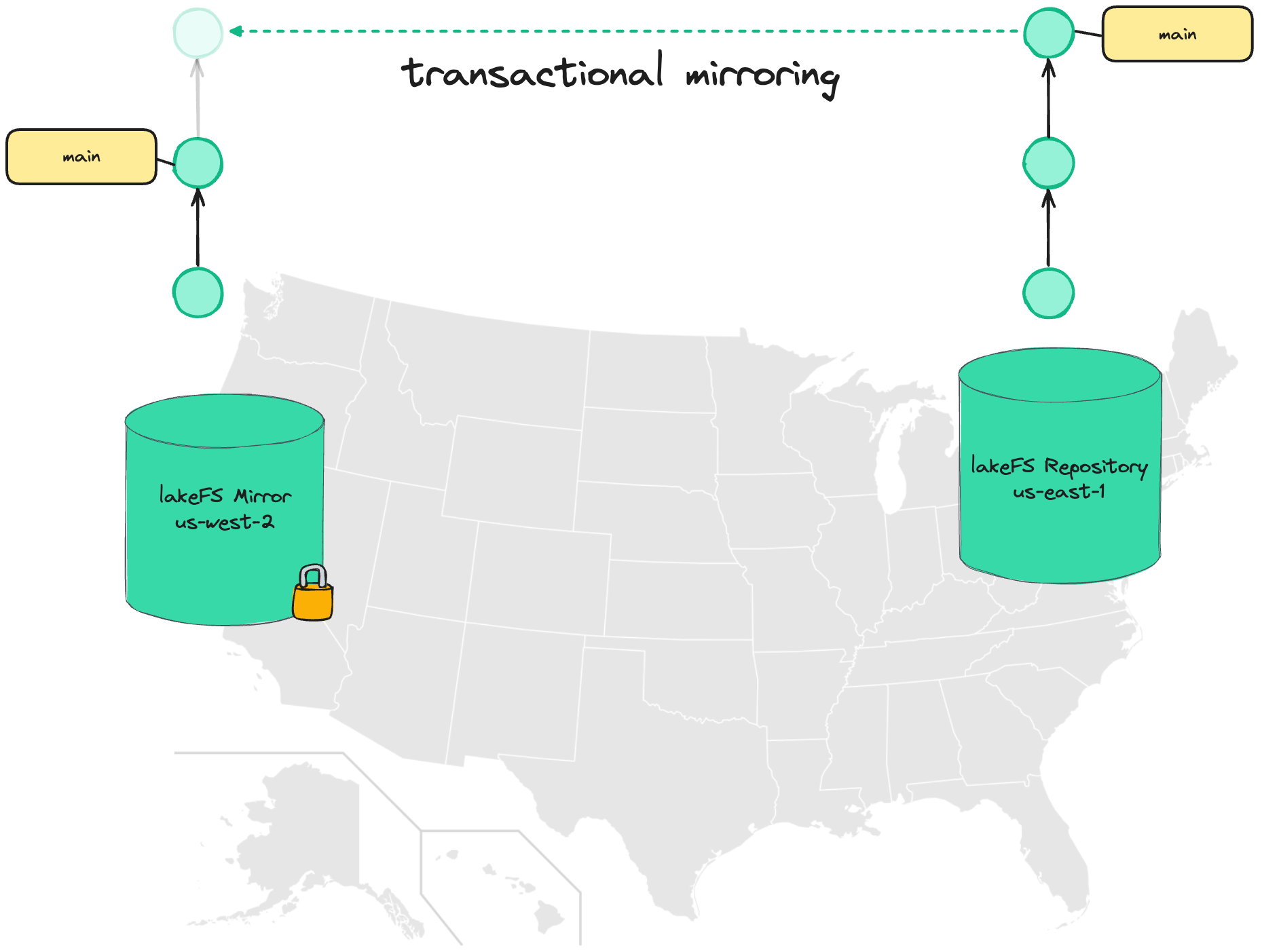
Transactional Mirroring in lakeFS allows replicating a lakeFS repository ("source") into read-only copies ("mirror") in different locations.
Unlike conventional mirroring, data isn't simply copied between regions - lakeFS tracks the state of each commit, advancing the commit log on the mirror only once a commit has been fully replicated and all data is available.
Use cases
Disaster recovery
Typically, object stores provide a replication/batch copy API to allow for disaster recovery: as new objects are written, they are asynchronously copied to other geo locations.
In the case of regional failure, users can rely on the other geo-locations which should contain relatively-up-to-date state.
The problem is reasoning about what managed to arrive by the time of disaster and what hasn't:
- have all the necessary files for a given dataset arrived?
- in cases there are dependencies between datasets, are all dependencies also up to date?
- what is currently in-flight or haven't even started replicating yet?
Reasoning about these is non-trivial, especially in the face of a regional disaster, however ensuring business continuity might require that we have these answers.
Using lakeFS Transactional Mirroring makes it much easier to answer: we are guaranteed that the latest commit that exists in the replica is in a consistent state and is fully usable, even if it isn't the absolute latest commit - it still reflects a known, consistent, point in time.
Data Locality
For certain workloads, it might be cheaper to have data available in multiple regions: Expensive hardware such as GPUs might fluctuate in price, so we'd want to pick the region that currently offers the best pricing. The difference could easily offset to cost of the replicated data.
The challenge is reproducibility - Say we have an ML training job that reads image files from a path in the object store. Which files existed at the time of training?
If data is constantly flowing between regions, this might be harder to answer than we think. And even if we know - how can we recreate that exact state if we want to run the process again (for example, to rebuild that model for troubleshooting).
Using consistent commits solves this problem - with lakeFS Transactional Mirroring, it is guaranteed that a commit ID, regardless of location, will always contain the exact same data.
We can train our model in region A, and a month later feed the same commit ID into another region - and get back the same results.
Architecture Overview
At minimum, Transactional Mirroring involves two lakeFS Enterprise installations, each in a different region or location, connected by a replication service that runs alongside each installation:
- Source lakeFS - The primary installation where data is written.
- Destination lakeFS - The installation hosting read-only mirror repositories.
- Replication Service - A sidecar service deployed alongside each lakeFS installation. It monitors source repositories, synchronizes commit metadata, and promotes branches on the destination once all data is available. Only branches are replicated; tags are not mirrored.
- Object Store Replication - The underlying object store (e.g., S3) must be configured to replicate objects between the source and destination buckets. lakeFS does not copy object data itself.
- Mirrors Database - A shared database (e.g., DynamoDB global table) that all replication services use to coordinate mirror state.
Multi-region topologies
The architecture is not limited to two regions. A source repository can be mirrored to multiple destinations (one-to-many), and each installation can participate in multiple mirroring relationships. Simply add additional dst_endpoints entries and configure object store replication for each destination.
Setting up Transactional Mirroring
Prerequisites
- Two or more lakeFS Enterprise installations, each in a different region/location.
- A valid lakeFS Enterprise license with the Transactional Mirroring capability. See License Configuration.
- Object store replication configured between source and destination buckets (see below).
- A shared database accessible from all regions for mirror coordination (e.g., a DynamoDB global table).
- Network connectivity: the replication service in each region requires HTTP access to the lakeFS API endpoint in the other regions.
Configuring object store replication
The objects within the repository are copied using your cloud provider's object store replication mechanism.
Refer to the AWS S3 replication documentation to configure replication from the source lakeFS repository's storage namespace to the destination bucket.
After setting the replication rule, new objects will be replicated to the destination bucket.
To replicate existing objects, use S3 batch replication.
Tip
For bidirectional mirroring (each region acts as source for some repositories), configure replication rules in both directions.
Configure your object store's native replication mechanism to replicate objects from the source storage namespace to the destination bucket. The specific steps depend on your cloud provider.
Creating a lakeFS user with a "replicator" policy
On each lakeFS installation, under Administration create a new user that will be used by the replication service. The user should have the following RBAC policy attached:
{
   "id": "ReplicationPolicy",
   "statement": [
      {
         "action": [
            "fs:ReadRepository",
            "fs:CreateRepository",
            "fs:UpdateRepository",
            "fs:DeleteRepository",
            "fs:ListRepositories",
            "fs:AttachStorageNamespace",
            "fs:ReadObject",
            "fs:WriteObject",
            "fs:DeleteObject",
            "fs:ListObjects",
            "fs:CreateCommit",
            "fs:ReadCommit",
            "fs:ListCommits",
            "fs:CreateBranch",
            "fs:DeleteBranch",
            "fs:RevertBranch",
            "fs:ReadBranch",
            "fs:ListBranches"
         ],
         "effect": "allow",
         "resource": "*"
      }
   ]
}
Alternatively, create a policy with a narrower scope, only for a specific repository and/or mirror:
{
   "id": "ReplicationPolicy",
   "statement": [
      {
         "action": [
            "fs:ListRepositories"
         ],
         "effect": "allow",
         "resource": "*"
      },
      {
         "action": [
            "fs:ReadRepository",
            "fs:ReadObject",
            "fs:ListObjects",
            "fs:ReadCommit",
            "fs:ListCommits",
            "fs:ReadBranch",
            "fs:ListBranches"
         ],
         "effect": "allow",
         "resource": "arn:lakefs:fs:::repository/{sourceRepositoryId}"
      },
      {
         "action": [
            "fs:ReadRepository",
            "fs:CreateRepository",
            "fs:UpdateRepository",
            "fs:DeleteRepository",
            "fs:AttachStorageNamespace",
            "fs:ReadObject",
            "fs:WriteObject",
            "fs:DeleteObject",
            "fs:ListObjects",
            "fs:CreateCommit",
            "fs:ReadCommit",
            "fs:ListCommits",
            "fs:CreateBranch",
            "fs:DeleteBranch",
            "fs:RevertBranch",
            "fs:ReadBranch",
            "fs:ListBranches"
         ],
         "effect": "allow",
         "resource": "arn:lakefs:fs:::repository/{mirrorId}"
      },
      {
         "action": [
            "fs:AttachStorageNamespace"
         ],
         "effect": "allow",
         "resource": "arn:lakefs:fs:::namespace/{DestinationStorageNamespace}"
      }
   ]
}
Once a user has been created and the replication policy attached to it, create an access key and secret for the replication service.
Same credentials on all installations
The replication service authenticates requests across regions using the same lakeFS credentials. The replication user must have the same access key ID and secret access key on every lakeFS installation involved in mirroring.
Use lakefs create-credentials to create a user with specific credentials on each installation:
lakefs create-credentials --access-key-id <ACCESS_KEY_ID> --secret-access-key <SECRET_ACCESS_KEY> <username>
Run this command against each lakeFS installation to ensure the replication user has identical credentials everywhere.
Deploying the Replication Service
The replication service is deployed alongside each lakeFS Enterprise installation using the lakeFS Helm chart. It runs as a separate Deployment within the same Helm release and must be deployed in every region participating in mirroring, not just the source.
Mirrors database
The replication service requires a shared database to coordinate mirror state between regions. This database must be accessible from both regions. It supports the same database types as lakeFS (see database configuration). The table/schema is created automatically by the replication service on startup if it doesn't already exist.
Provide the table name in the mirrors_database configuration. The replication service will create the table automatically if it doesn't exist.
To enable cross-region replication, you must configure the table as a DynamoDB global table with a replica in the destination region. This requires enabling DynamoDB Streams with NEW_AND_OLD_IMAGES view type on the table.
For cross-account setups, see DynamoDB multi-account global tables.
Provide a PostgreSQL or CockroachDB database that is accessible from both regions. Use the same connection string in the mirrors_database configuration on each installation.
Helm chart configuration
Enable the replication service in your values.yaml for each lakeFS installation:
replication:
  enabled: true
  image:
    repository: treeverse/replication
    tag: <version>
  serviceAccountName: <service-account-with-required-permissions>
  extraEnvVarsSecret: <secret-name>  # K8s secret containing replication credentials
  config:
    # Identifier for the region where this lakeFS installation runs
    region: "us-east-1"

    # Organization identifiers
    organization_id: "my-org"

    # The lakeFS endpoint in this region (accessible from within the cluster)
    regional_endpoint: "http://lakefs.default.svc.cluster.local:80"

    # lakeFS endpoints in other regions that this installation mirrors to/from
    dst_endpoints:
      us-west-2: "https://lakefs-west.example.com"

    # Mirror coordination database (must be shared between all regions)
    mirrors_database:
      type: dynamodb
      dynamodb:
        table_name: lakefs-replication-table
        aws_region: us-east-1

    # Block storage configuration (must match the lakeFS blockstore config)
    blockstore:
      type: s3
      s3:
        region: us-east-1

    auth:
      encrypt:
        # Must match the auth.encrypt.secret_key used by the lakeFS installation
        secret_key: "<same-secret-key-as-lakefs>"

    logging:
      level: INFO
      format: json
Note
The refstore_database (used for replication metadata) is automatically populated from the lakeFS database configuration. You do not need to set it unless you want to use a separate database.
Replication credentials secret
Create a Kubernetes secret containing the replication user credentials and the auth encryption key:
kubectl create secret generic replication-secrets \
  --from-literal=source_lakefs_access_key_id=<ACCESS_KEY_ID> \
  --from-literal=source_lakefs_secret_access_key=<SECRET_ACCESS_KEY> \
  --from-literal=auth_encrypt_secret_key=<AUTH_ENCRYPT_SECRET_KEY>
Where:
ACCESS_KEY_ID&SECRET_ACCESS_KEY- Credentials for the replication user created in the previous step.AUTH_ENCRYPT_SECRET_KEY- Must be the sameauth.encrypt.secret_keyconfigured for the lakeFS installation. This is required for the replication service to authenticate requests.
Then reference the secret in your Helm values:
Example: Two-region setup on AWS
Below is a complete example for a two-region setup with lakeFS in us-east-1 (source) and us-west-2 (destination).
Source region (us-east-1) replication config:
replication:
  enabled: true
  config:
    region: "us-east-1"
    organization_id: "my-org"
    regional_endpoint: "http://lakefs-source.mirroring.svc.cluster.local:80"
    dst_endpoints:
      us-west-2: "http://lakefs-dest-internal.example.com:80"
    mirrors_database:
      type: dynamodb
      dynamodb:
        table_name: my-replication-table
        aws_region: us-east-1
    blockstore:
      type: s3
      s3:
        region: us-east-1
    auth:
      encrypt:
        secret_key: "<shared-secret>"
    logging:
      level: INFO
Destination region (us-west-2) replication config:
replication:
  enabled: true
  config:
    region: "us-west-2"
    organization_id: "my-org"
    regional_endpoint: "http://lakefs-dest.mirroring.svc.cluster.local:80"
    dst_endpoints:
      us-east-1: "http://lakefs-source-internal.example.com:80"
    mirrors_database:
      type: dynamodb
      dynamodb:
        table_name: my-replication-table
        aws_region: us-west-2
    blockstore:
      type: s3
      s3:
        region: us-west-2
    auth:
      encrypt:
        secret_key: "<shared-secret>"
    logging:
      level: INFO
Important
Both installations must use the same organization_id and the same auth.encrypt.secret_key. The mirrors_database table must be a global/shared table accessible from both regions.
Creating a mirror
Once both lakeFS installations and their replication services are running, create a mirror by calling the replication API on the source region's replication service. This call only needs to be made once - the destination replication service will automatically detect the new mirror and create the repository on the destination.
curl '<REPLICATION_ENDPOINT>/service/replication/v1/repositories/<SOURCE_REPO>/mirrors' \
--header 'Content-Type: application/json' \
-u <ACCESS_KEY_ID>:<SECRET_ACCESS_KEY> \
-X POST \
--data '{
    "name": "<MIRROR_NAME>",
    "region": "<DESTINATION_REGION>",
    "storage_namespace": "<MIRROR_STORAGE_NAMESPACE>"
}'
REPLICATION_ENDPOINT- The URL of the replication service in the source regionSOURCE_REPO- Name of the repository acting as the replication source. It should exist on the source installationACCESS_KEY_ID&SECRET_ACCESS_KEY- Credentials for your lakeFS replication user (make sure you have the necessary RBAC permissions as listed below)MIRROR_NAME- Name used for the read-only mirror to be created on the destinationDESTINATION_REGION- The region identifier of the destination (must match theregionconfigured in the destination's replication service)MIRROR_STORAGE_NAMESPACE- The storage namespace on the destination bucket where replicated data is stored
Transactional Mirroring and Garbage Collection
Garbage collection won't run on mirrored repositories. Deletions from garbage collection should be replicated from the source:
- Enable DELETED marker replication on the source bucket.
- Create a lifecycle policy on the destination bucket to delete the objects with the DELETED marker.
RBAC
These are the required RBAC permissions for working with Transactional Mirroring:
Creating a Mirror:
| Action | ARN |
|---|---|
fs:CreateRepository |
arn:lakefs:fs:::repository/{mirrorId} |
fs:MirrorRepository |
arn:lakefs:fs:::repository/{sourceRepositoryId} |
fs:AttachStorageNamespace |
arn:lakefs:fs:::namespace/{storageNamespace} |
Editing Mirrored Branches:
| Action | ARN |
|---|---|
fs:MirrorRepository |
arn:lakefs:fs:::repository/{sourceRepositoryId} |
Deleting a Mirror:
| Action | ARN |
|---|---|
fs:DeleteRepository |
arn:lakefs:fs:::repository/{mirrorId} |
Listing/Getting Mirrors for a Repository:
| Action | ARN |
|---|---|
fs:ListRepositories |
* |
Other replication operations
Listing all mirrors for a repository
curl '<REPLICATION_ENDPOINT>/service/replication/v1/repositories/<SOURCE_REPO>/mirrors' \
-u <ACCESS_KEY_ID>:<SECRET_ACCESS_KEY> -s
Getting a specific mirror
curl '<REPLICATION_ENDPOINT>/service/replication/v1/repositories/<SOURCE_REPO>/mirrors/<MIRROR_ID>' \
-u <ACCESS_KEY_ID>:<SECRET_ACCESS_KEY> -s
Deleting a specific mirror
curl -X DELETE '<REPLICATION_ENDPOINT>/service/replication/v1/repositories/<SOURCE_REPO>/mirrors/<MIRROR_ID>' \
-u <ACCESS_KEY_ID>:<SECRET_ACCESS_KEY>
Configuration Reference
The replication service is configured via the Helm chart values under replication.*. All fields below are set in your values.yaml.
Note
Simple configuration values can also be set via environment variables with the REPLICATION_ prefix (e.g., REPLICATION_REGION=us-east-1). Map fields like dst_endpoints must be set via the config file. Sensitive values like credentials should be provided via a Kubernetes Secret referenced by replication.extraEnvVarsSecret.
Helm chart values
| Field | Default | Description |
|---|---|---|
replication.enabled |
false |
Set to true to enable the replication service deployment |
replication.image.repository |
treeverse/replication |
Docker image repository |
replication.image.tag |
0.1.17 |
Docker image tag |
replication.image.pullPolicy |
IfNotPresent |
Image pull policy |
replication.port |
8008 |
Service port |
replication.serviceAccountName |
"" |
Kubernetes service account for the replication pod. See Service account and cloud permissions |
replication.extraEnvVarsSecret |
Name of a Kubernetes Secret containing sensitive configuration. When set, the following keys are injected as environment variables: source_lakefs_access_key_id, source_lakefs_secret_access_key, auth_encrypt_secret_key |
|
replication.extraEnvVars |
[] |
Additional environment variables for the replication pod |
replication.resources |
{} |
Kubernetes resource requests/limits |
replication.podAnnotations |
{} |
Additional pod annotations |
replication.local_cache.base_dir |
/cache |
Local cache directory path |
replication.local_cache.size_bytes |
512000000 |
Local cache size in bytes |
Service account and cloud permissions
When the replication service needs access to cloud resources (e.g., DynamoDB, S3), use a Kubernetes service account with the appropriate annotations to grant permissions. On AWS, this is done using IAM Roles for Service Accounts (IRSA). For detailed instructions on setting up the IAM role, see the lakeFS deployment guide.
Example service account:
apiVersion: v1
kind: ServiceAccount
metadata:
  name: replication-sa
  annotations:
    eks.amazonaws.com/role-arn: arn:aws:iam::<ACCOUNT_ID>:role/<ROLE_NAME>
Then set replication.serviceAccountName: replication-sa in the Helm values.
Replication service config (replication.config)
Required fields
| Field | Description |
|---|---|
region |
Region identifier for this lakeFS installation (e.g., us-east-1) |
organization_id |
Organization identifier, used internally as a partition key in the mirrors database. For on-prem deployments, use any consistent string (e.g., your company name). Must be the same across all installations |
regional_endpoint |
URL of the lakeFS API in this region (e.g., http://lakefs.default.svc.cluster.local:80) |
dst_endpoints |
Map of region identifier to lakeFS URL for each remote region |
mirrors_database |
Database configuration for mirror coordination (DynamoDB, PostgreSQL, or CockroachDB). Must be shared across all regions. See Mirrors database |
blockstore |
Block storage configuration. Must match the lakeFS blockstore config |
lakefs_access_key_id |
Access key ID for the replication lakeFS user. Can also be provided via extraEnvVarsSecret (recommended) |
lakefs_secret_access_key |
Secret access key for the replication lakeFS user. Can also be provided via extraEnvVarsSecret (recommended) |
auth.encrypt.secret_key |
Encryption secret key. Must match the lakeFS auth.encrypt.secret_key. Can also be provided via extraEnvVarsSecret (recommended) |
Optional fields
| Field | Default | Description |
|---|---|---|
organization_name |
Organization name. Only used to auto-construct regional_endpoint for lakeFS Cloud. Not needed when regional_endpoint is set |
|
listen_address |
0.0.0.0:8008 |
HTTP listen address for the replication service API |
refstore_database |
Database for replication metadata (commits, ranges, metaranges). When deployed via the Helm chart, this defaults to the lakeFS database configuration if not explicitly set. When running outside the Helm chart, this field is required |
|
list_mirrors_page_size |
1000 |
Page size when listing mirrors |
list_repositories_page_size |
1000 |
Page size when listing repositories |
logging.level |
INFO |
Log level (DEBUG, INFO, WARN, ERROR) |
logging.format |
text |
Log format (text, json) |
Committed metadata
Configuration for committed metadata (ranges and metaranges).
| Field | Default | Description |
|---|---|---|
committed.local_cache.size_bytes |
1073741824 (1 GiB) |
Local cache size in bytes |
committed.local_cache.dir |
Cache directory path | |
committed.local_cache.range_proportion |
0.9 |
Proportion of cache allocated to ranges |
committed.local_cache.metarange_proportion |
0.1 |
Proportion of cache allocated to metaranges |
committed.metadata_prefix |
_lakefs/ |
Prefix used by lakeFS for metadata files in the storage namespace. Must match committed.block_storage_prefix in lakeFS |
Commit sensor
Controls how the service detects and synchronizes new commits from source to destination.
| Field | Default | Description |
|---|---|---|
commit_sensor.process_branches_duration |
1m |
How often to scan for branch changes |
commit_sensor.branches_scanner_concurrency_limit |
10 |
Number of concurrent branch scanning workers |
commit_sensor.list_branch_page_size |
1000 |
Page size when listing branches |
commit_sensor.log_commit_page_size |
1000 |
Page size when fetching commit logs |
Mirrors manager
Controls how the service reconciles mirror state (creates/deletes mirror repositories).
| Field | Default | Description |
|---|---|---|
mirrors_manager.process_mirrors_interval_duration |
20s |
Interval between mirror reconciliation runs |
Validator
Controls how the service validates that all metadata for promoted commits exists in block storage before advancing the mirror.
| Field | Default | Description |
|---|---|---|
validator.run_interval |
1m |
Interval between validation runs |
validator.num_workers |
3 |
Number of concurrent metarange validation workers |
validator.cooldown_on_missing |
1m |
Cooldown before retrying validation of a missing metarange |
validator.cooldown_on_error |
1m |
Cooldown before retrying validation after an error |
validator.metarange_presence_cache.size |
5000 |
Number of metarange presence results to cache |
validator.metarange_presence_cache.expiry |
1440h (60 days) |
Metarange cache entry expiry |
validator.metarange_presence_cache.cooldown |
30s |
Cooldown before retrying a missing metarange in cache |
validator.range_presence_cache.size |
500000 |
Number of range presence results to cache |
validator.range_presence_cache.expiry |
1440h (60 days) |
Range cache entry expiry |
validator.range_presence_cache.cooldown |
10s |
Cooldown before retrying a missing range in cache |
validator.object_presence_cache.size |
5000000 |
Number of object presence results to cache |
validator.object_presence_cache.expiry |
24h |
Object cache entry expiry |
validator.object_presence_cache.cooldown |
5s |
Cooldown before retrying a missing object in cache |
validator.storage_namespace_cache.size |
1000 |
Number of repository-to-storage-namespace mappings to cache |
validator.storage_namespace_cache.expiry |
17s |
Storage namespace cache entry expiry |
Auth
| Field | Default | Description |
|---|---|---|
auth.encrypt.secret_key |
(required) | Encryption key for stored credentials. Must match the lakeFS installation. Can also be provided via extraEnvVarsSecret (recommended) |
auth.cache.enabled |
false |
Enable auth response caching |
auth.cache.size |
Number of cached auth entries | |
auth.cache.ttl |
Cache entry time-to-live | |
auth.cache.jitter |
Random jitter added to cache TTL to prevent thundering herd |
Limitations
- Transactional Mirroring is currently only supported on AWS S3
- Read-only mirrors cannot be written to. Transactional Mirroring is one-way, from source to destination(s)
- Currently, only branches are mirrored. Tags and arbitrary commits that do not belong to any branch are not replicated
- lakeFS Hooks will only run on the source repository, not its replicas
- Replication is asynchronous: reading from a branch will always return a valid commit that the source has pointed to, but it is not guaranteed to be the latest commit the source branch is pointing to